Author: Abel Verkey

  • 3 Best VPN Services for WordPress Users Compared

    3 Best VPN Services for WordPress Users Compared

    During the COVID-19 pandemic, we saw several companies adopting remote work that transformed the way of working sustainably. But with remote work, there is always a security concern, especially for WordPress websites. This can be resolved by installing a VPN client on your device. Without the layer of security, a threat actor can exploit your website.

    In this article, we will do a brief comparison of the 3 best VPN services for WordPress users. So, let’s get started!

    Before we do the comparison of VPN services, let us first understand What is a VPN.

    What is VPN?

    A virtual Private Network or commonly known as VPN is a service that offers you privacy and anonymity by connecting your internet through its encrypted tunnel.

    When you use a VPN, an additional layer of security is added to the HTTPS’ SSL layer. Furthermore, a VPN allows you to browse public Wi-Fi without any hesitation, mask your IP address for anonymity, or for blocking trackers and ads.

    Note: The above-mentioned features are only offered by a premium VPN.

    Now, let us discuss the working of the VPN.

    How Does VPN Work?

    A VPN routes the internet traffic via its encrypted tunnel and replaces the IP address. By doing so, VPN ensures that a safe and secure connection is created.

    When a VPN is active, your device can’t be easily traced thereby adding an additional level of privacy and anonymity which will further help in:

    • To Bypass geo-location based restrictions (access the content which is unavailable in your country)
    • Hiding your online activity and location so that reverse tracing on the internet becomes difficult.
    • Securely use VPN for torrenting purposes while not losing the download speed.
    • Secure connectivity to a business network or internet banking no matter wherever you are on the earth.
    • Create a whitelist of IP addresses.

    A VPN service ensures that your website is protected against cyber threats.

    Features of a Reliable VPN

    You can find a plethora of VPN services on the internet. However, picking the best VPN service can be confusing.

    Below, we have offered a few tips that you need to consider before picking a reliable VPN for your WordPress website.

    • 256- bit encryption: The most advanced level of encryption. This will ensure that no outsiders will be able to safeguard your personal data.
    • Kill switch Feature: This feature is enabled while the VPN connection is unexpectedly disrupted and will disconnect you from the web to avoid probable data leaks.
    • Protection against DNS and IPv6 leaks.
    • Strict zero-log policy: It restricts VPN services from tracking the online activities of the users.
    • Customer Support: Ensure the VPN service provider you choose offers 24/7 live chat support.
    • Multiple Devices Compatibility: Check the service’s site to know more about their service before installation.
    • Bigger Server Network: It is advisable to pick a VPN provider that has its server spread across the globe. Having multiple servers across the globe will simplify access to content from other countries.
    • Servers are configured for streaming and P2P file sharing
    • Multiple connection support
    • High bandwidth for faster speed

    3 Best VPNs for WordPress

    So, the 3 best VPNs that will help you safeguard your WordPress website are;

    NordVPN

    Nord VPN is a well-known VPN service provider offering high-speed and ultra-secure services. It has 4000+ servers spread all over the world.

    One of the major highlights of this VPN is its UI. The UI is pretty simple and easy to understand.

    • Nord VPN has 4800 servers in 62 countries
    • Uninterrupted streaming
    • P2P connection and unlimited bandwidth
    • Military-grade double-layer encryption
    • Zero-log policy support
    • Split tunneling
    • IP masking
    • Onion over VPN (Tor Support)
    • One account can link up to 6 devices

    Pricing:

    • $ 03.71 / Month — 2-Year Plan
    • $ 03.71 / Month — 2-Year Plan
    • $ 11.95 / Month — 1 Month Plan

    Nord VPN offers a 30-day money-back guarantee with all its plans.

    IPVanish

    IPVanish is the second best VPN service on our list. IPVanish offers you access to 400+ servers located in 61 countries.

    Their enormous range of networks ensures that you stay private on the internet.

    IPVanish has a strict no logging policy; so, you don’t need to worry about getting tracked on the internet.

    • The service supports 2000+ global servers
    • Quite simple to install
    • Offers 256-bit AES encryption
    • Avoid Geo-Targeting in Its Tracks
    • Bypass Censorship
    • Avoid Deep Packet Inspection
    • Unmetered device connections
    • Data sharing controls
    • DNS/IPv6 leak protection
    • Kill switch feature
    • More secure cloud backup

    Pricing:

    • $ 9.99 / Month — For the Monthly plan
    • $ 89.9 / Month — For the Annual plan

    ExpressVPN

    ExpressVPN is an ultra-secure VPN service popular for offering lightning-fast download speed. This VPN has a user-friendly app from which you can manage your VPN connection.

    Express VPN has about 160 servers spread in 94 countries. This VPN service provider has 24/7 dedicated customer support.

    • The service supports more than 2000 global servers
    • Easy to install
    • 256-bit AES encryption
    • IP address masking
    • No connection logs
    • Low ISP throttling
    • DNS/IPv6 leak protection
    • Kill switch feature
    • Unlimited bandwidth

    Pricing

    • $ 08.32 / Month — 12 Months Plan
    • $ 09.99 / Month — 6 Months Plan
    • $ 12.95 / Month — 1 Month Plan

    ExpressVPN offers 30-day money-back guarantee with all its plans.

    Conclusion

    One must use VPN to secure their privacy and their identity on the internet.

    Often, websites that are powered by WordPress comprise several marketing scripts that are actively used to track the users. Most commonly, the cookies are used for retargeting on social media accounts.

    A VPN can fix this issue too, it can block trackers and ads so you can surf the internet without worrying about any tracking service following you.

    Meanwhile, you can read the article “Benefits Of Unmetered Dedicated Servers“.

    Moreover, you can check out our Linux Reseller Hosting plans that offer website security.

  • Best WordPress Security Plugins to Look For in 2022

    Best WordPress Security Plugins to Look For in 2022

    WordPress is the most popular content management system with over 65% market share. Unfortunately, the popularity of WordPress attracts not only bloggers and developers but also threat actors and hackers who try to exploit the security of WordPress through DDoS attacks and Bruteforce attacks. To avoid such attacks, you must use one of the best WordPress security plugins to enhance your WordPress website’s security.

    Searching for the ideal security plugin can be a daunting and monotonous task, as many options are available on the WordPress market. So, we have curated this article to help you pick the best WordPress security plugin to safeguard your WordPress website.

    WordPress Security Plugins in 2022

    Sucuri Security

    With over 800K+ active installations, Sucuri is one of the most highly utilized WordPress security plugins. This plugin offers a comprehensive suite of security features. However, the free version doesn’t offer firewall access which I feel is extremely important for the security of the WordPress website.

    Features offered by Sucuri:

    • Security activity auditing
    • Advanced DDoS protection (Bundled with some plans)
    • SSL Certificates
    • 24/7 round-the-clock support over chat, email, and tickets
    • Malware scanning, file integrity monitoring, and security hardening

    The pricing of Sucuri starts at $9.99 per month and goes up to $499.99 per month for business platform plans.

    WordFence

    With more than 4 million+ active installations, WordFence is a powerful security plugin capable of securing your website against brute force attacks. One of the major highlights of this plugin is that it offers complete insights into website traffic in real-time, which will allow identifying hacking attempts if any.

    Features of WordFence:

    • Real-time traffic monitoring
    • Web Application Firewall
    • Spam comment blocking
    • Website security auditing via phone
    • Plugin monitoring (alerts about outdated plugins)

    The pricing of WordFence starts at $99 per year for a one-site license and goes as low as $74.25 per year for each site when you subscribe for a license for 15+ websites.

    All in One WP Security and Firewall

    All-in-One WP Security and Firewall, with more than 900K+ active installations, is the third-best WordPress security plugin. This is one of the most user-friendly wordPress security plugins. The plugin audits the website and provides a score based on which you can determine the security. This plugin’s firewall has 3 distinct categories; basic, intermediate, and advanced.

    Features of All in One WP Security and Firewall:

    • Easily backup .htaccess and .wp-config files
    • Custom blocklist tool to set rules as per the user pattern
    • Security against brute force attacks
    • Prevents the copying of texts from the front-end

    In our WordPress security plugin list, All-in-one WP Security & Firewall Plugin is the only security plugin available for free.

    iThemes Security

    iThemes Security has two versions; pro and free. We suggest that you go for iThemes Security Pro as the free version offers only a handful of basic features. The pro version offers timely database backups, limits login attempts, and enforces strong password and two-factor authentication. Additionally, the plugin comes with a 30-day money-back guarantee.

    Features of iThemes Security:

    • File type security (detects the edits in the file)
    • 404 error detection, security against brute force attacks
    • Google ReCaptcha for added protection
    • Partial website backup and enforcement of SSL.

    iThemes Security pricing starts from $80 per year and goes up to $499 per year.

    Conclusion

    Sucuri is the best WordPress security plugin that offers a complete range of security features at premium pricing. On the other hand, if you are looking free WordPress security plugin, the All in One WP Security and Firewall is the best free security plugin.

  • What is an HTTP Error, The Most Common HTTP Errors Found in a Website

    What is an HTTP Error, The Most Common HTTP Errors Found in a Website

    While you are surfing on the internet casually, you try to open up your favorite website only to find it is down due to some HTTP Error. Now, you might be wondering what caused the website to go down? Don’t worry, in this article, we will explain to you what an HTTP error is? and some of the most common HTTP errors found in a website.

    However, before delving deep into our topic, let’s first understand what an HTTP Error is?

    Understanding What is an HTTP Error?

    When the client (web browser) makes requests to the server, the server manages the request and sends responses to the client. These responses depend on how the request is being managed. Even though the response from the server differs at times but mostly includes client errors, server errors, redirects, etc.

    Basically, HTTP error codes define the reason why the server failed to service your request.

    Now, as we have got a briefing about What an HTTP error is, let’s see some of the most common HTTP error codes that can bring negative impact to a website.

    Most Common HTTP Error Codes:

    Moving ahead, here are the 6 common HTTP error codes that are critical for your website.

    HTTP Error 401: Unauthorized

    The 401 status code or unauthorized error is the first common HTTP error code that we will discuss. This error simply means that the server either obtained an unauthorized request or couldn’t properly authenticate the request.

    Alternatively, the 401 Error means that you either don’t have permission to view the page.

    Fix

    • Check if the URL is correct
    • Clear browser cache and cookies

    HTTP Error 400: Bad Request

    Next, in our list of HTTP Error codes is the 400 status code or bad request code. This error signifies that the server received an invalid syntax HTTP request.

    Some other reasons for HTTP 400 Error are:

    • The site cookies got corrupted
    • You are using a defective browser

    Fix

    • Check if the link has been typed correctly
    • Clear the cookies of your browser

    HTTP Error 404: Page Not Found

    Second in our list of the most common HTTP errors is the 404 status code. The 404 status code or the page not found error simply signifies that the user isn’t able to discover the requested file or resource as it has been moved, deleted, or doesn’t exist in the server.

    Meanwhile, you can read our blog post on failed to load resource error to fix the 404 error in WordPress.

    HTTP Error 403: Forbidden Error

    If you observe the 403 status code or Forbidden error, it simply signifies that you don’t have permission to view that page.

    Another reason for HTTP Error 403 is that the IP address specified in the .htaccess settings is used to deny requests.

    Open the .htaccess file and check if your IP is blocked or not.

    HTTP Error 500: Internal Server Error

    The 500 status code or the Internal Server Error is a generic error that occurs when the server isn’t able to process the request for some unexplained reason.

    This error is displayed to the user either due to a corrupt .htaccess file or packages are missing as PHP isn’t installed appropriately on your server.

    Some other reasons why you are experiencing 500 Internal Server Error are:

    • Bandwidth got exhausted
    • Inadequate storage space
    • Sudden surge in website traffic

    If you are experiencing the 500 HTTP Error due to the above reasons, we suggest that you go for Cloud Hosting plans as it follows the pay-as-you-go model so your server resource will never get exhausted. Another benefit of Cloud Hosting is data redundancy. With data redundancy, you have a slight level of website backup as your data is stored in various places.

    HTTP Error 503: Service not available

    Last, in our list of Common HTTP Error Codes is 503 HTTP Error. The 503 status code or service unavailable error occurs when the server is either on scheduled maintenance or facing an overload of requests and can’t serve a new request.

    As this HTTP error is a server-side error, you can only contact your hosting provider and report the issue.

    If your website regularly faces HTTP error 503, then it could be because of your web hosting service provider’s negligence.

    As we discussed, most of the common HTTP errors occur when the server faces some issues and thereby fails to service the request.

    Switch to ByteNAP web hosting services to overcome this issue for a lifetime. ByteNAP is India’s leading hosting company, provides cheap web hosting India. You can Buy Cheap Linux VPS, which is highly optimized for online business with a 99.9% uptime guarantee.

  • Why Keep Email and Hosting Separate?

    Why Keep Email and Hosting Separate?

    This blog post is all about why you should keep email and web hosting separate. Also, why emails are still an important communication medium for businesses.

    Most hosting providers offer email hosting bundled with their web hosting plans. Having an email account with the domain name seems exciting and every business must have a business email. Having a business mail grabs more trust from a client than having any personal email like Gmail, Rediffmail, Yahoo, etc.

    Before we dig deep into the reasons for keeping email and web hosting separate, let’s first see why email is important for both business and personal use.

    Why Email is Important for Personal and Business Usage?

    Even while the advancement of messaging channels, email is still considered a successful method of reaching people. In spite of all the instant platforms available in the market, email is more direct as it is universal.

    According to Statista, there are 4 billion email users all over the earth, almost the same as the total combined users of WhatsApp, Facebook Messenger, Telegram, and Snapchat.

    It is said that in the future the numbers will rise even more and with a penetration rate of about 90%, email is going to stick around for a long time.

    Why You Should Keep Email and Hosting Separate?

    Keeping your email and hosting separate will help fight against:

    • Fight against spam: Usually the web hosts offer terrible spam filters that risks in filling up your inbox with spam mails. Go for an ideal business email provider to avoid getting spammed.
    • Deliverability: Emails sent from WordPress site are generally shown in spam folder.
    • Storage: Email and the attachments in it can use up the space which can be used for your website.
    • Reliability: In case if the server goes down, you can’t access email as well as website.
    • Migration: Website migration is easy however email migration is complex. Having seperate hosts will help you slightly in migration.

    Best Email Hosting Providers

    Here are some of the email hosts that you can trust:

    • Google Workspace is ideal for businesses and bloggers who are looking for domain emails. The company being huge itself, there is no surprise that this email host offers one of the best spam filtering and email deliverability. One drawback is that it is one of the most expensive email host with $6 per month.
    • Microsoft 365 is yet another email host which you can blindly trust upon. At $5/mo, Microsoft 365 is cheaper than Google Workspace. On the plus side, it offers you the web versions of PowerPoint, Excel and Word.
    • Zoho Mail is an excellent choice for businesses that require tailor made communication needs. Zoho mail comes at just over $1.7 per month.

    Conclusion

    Businesses do require an email for carrying out important communication with their clients. This means that email plays a major role in communication among team members, clients, and vendors. If your business depends heavily on emails, then you should go for reliable business email hosting.

    Additionally, you can check out the Google Workspace plans powered by Google Cloud.

  • How to Perform a Successful Cloud Migration? | Cloud Migration Best Practices

    How to Perform a Successful Cloud Migration? | Cloud Migration Best Practices

    Several small and medium businesses are looking for cloud-based solutions to meet their computing needs. There’s no doubt that cloud migration is on-trend and various business organizations are adopting it. The reasons why businesses shift to the cloud can range from increasing the cost and IT efficiency to fostering remote workforces and boost deployment.

    Migrating to the cloud can be a challenging process even for the skilled IT team. However, if you have the right plans and checklist, you can minimize the risks and find success.

    Hence, we have created a checklist that will help you successfully migrate your business to the cloud.

    What is a Cloud Migration?

    Cloud Migration is the method wherein the workloads and applications are shifted to the cloud hosting environment. Here, the migration process is to shift conventional web servers or hosting infrastructure into the cloud or moving one cloud to another cloud.

    The cloud environment can be a private cloud, hybrid cloud, public cloud, or multi-cloud.

    Generally, businesses migrate to cloud infrastructure to manage the expenses on infrastructure or take maximum advantage of new technologies.

    Cloud Migration Summary

    The process of moving the webserver and other hosting infrastructure to the cloud includes the following processes:

    • Carry out an audit, where the exisisting applications, data sets, security should be examined and checked for any privacy risks. If any risk is found, eliminate it before you proced with migration.
    • Next step is to pick the ideal cloud infrastructure that meets your business needs. The new cloud environment you choose should have enough storage space and processing power to manage your current workloads and is future ready.
    • Consider the security of the cloud and its compliance this includes the policies of cloud hosting provider, where will your data be stored (Is it on public cloud or private cloud), encryption options, permission settings and so on.

    Creating a migration project plan is crucial for minimizing the risks involved in cloud migration. Let’s see what the plan includes:

    • Make a detailed note of each of the components in your current infrastructure.
    • Which of those componets will be migrated in the process and to where?
    • What will be the state of the unnecessary assets or surplus infrastructure once the migration completes.

    The migration plan should be discussed with the stakeholders and take in the feedback to make any possible changes to the plan.

    Benefits of Cloud Migration

    There can be multiple reasons to migrate to the cloud, let’s see eight of the most common benefits of migrating to the cloud:

    Better Performance and Robust Setup

    Cloud environment enables to easily scale new and current environments thereby making the testing and deployment process increasingly adaptive.

    Minimize the Overall Cost

    With cloud computing, the overall cost is minimized as there is no maintenance cost of infrastructure. Moreover, several cloud providers offer their plans on a pay-as-you-go model. So, you only pay for the resource you use.

    Centralized Deployment for Simpler Collaboration

    Centralized deployment allows people to collectively work on the same projects.

    Numerous Backup Solutions

    With cloud computing, you have a plethora of backup solutions that will help your website or application recover in case of a catastrophic failure. Backup is an extremely effective solution especially during a misfortunate event like a system getting hacked or compromised.

    Suggested For Further Reading:

    Improved Security Features

    Most cloud vendors take severe security measures to protect the infrastructure against various cybersecurity threats. They use firewalls to keep out illegitimate traffic from accessing the system, apply security patches for securing against security vulnerabilities.

    In-built Status Monitoring

    Real-time monitoring of the network. This means watching over the pings, ports, packets, hits, traffic, hacks, or anything else. If any unusual activity is going on your network, you will instantly receive an alert.

    Boost the Growth of Organization

    Cloud computing allows organizations to easily integrate new acquisitions to current platforms. Additionally, it also helps to scale quickly with the auto-scaling functionality and flexible data management services.

    On-Demand Scalability

    With a cloud environment, you can easily scale the resources of the server in few clicks. You can increase the server capacity on holidays and big events and also set it back to normal on regular days.

    Comprehensive Checklist for Your Cloud Migration Strategy

    Now, as you got some idea of how to migrate to the cloud and its benefits. Let’s sketch out the details that are required to carry out the process.

    Create a Detailed List of Applications, and Datasets

    Ensure that you make a detailed list of all your assets before doing the migration process. This will give you clarity about what needs to be shifted for cloud migration.

    Eliminate the Security Risks Before Migration

    You must perform an audit to analyze the infrastructure and eliminate the security risks if you find any. Here, the risks can be software or hardware-related.

    Before doing the migration process, you need to ask yourselves whether the process will create a risk to data, would you be to continue your business before and after migration?

    Plan and Test Cloud Migration Project

    Before you perform actual cloud migration, ensure that you test the plan; go through various probable use cases, and optimize it for the preferred results.

    Pick the Ideal Cloud Vendor

    Picking the right cloud vendor not only makes the migration process simple but also offers cloud scalability, cloud elasticity, and cloud monitoring.

    Setting up the new infrastructure is of utmost importance

    I hope this article helped you understand our blog post on cloud migration. Additionally, you can opt for cheap cloud VPS plans.

  • How to Fix Error 520: Web Server Is Returning An Unknown Error

    How to Fix Error 520: Web Server Is Returning An Unknown Error

    Have you ever seen an annoying Server Error 520? Web Server Is Returning An Unknown Error and wondered what causes this? Let’s find out with this article.

    The Cloudflare 520 error is yet another common HTTP error. It can be frustrating for you as it can increase the bounce rate of your website.

    fix-error-520
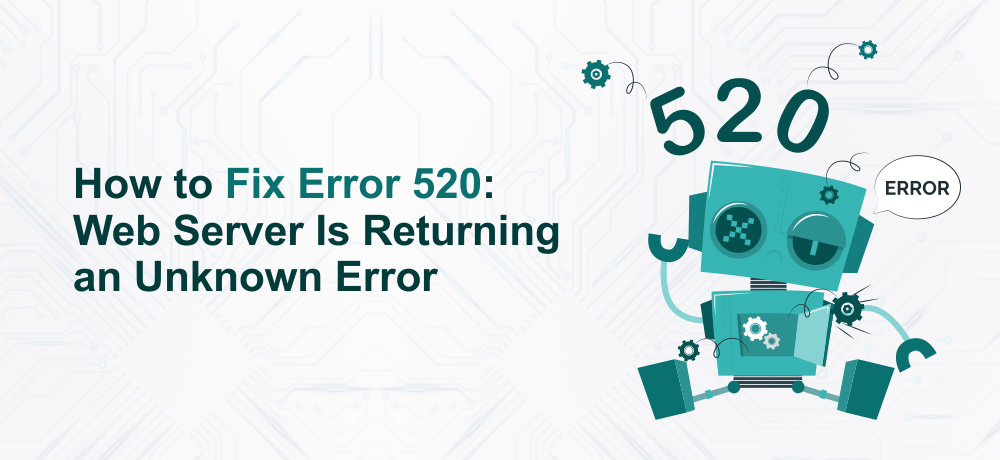
    Example of Error 520

    Usually, error 520 occurs when the origin server doesn’t work properly as expected and couldn’t service the request. As a result, returns an empty, unknown or unexpected response. The most common reason for the error to occur is either a cronjob, the program is utilizing excessive server resources which makes the server misbehave and not able to manage all the requests appropriately.

    Below are few probable reasons for the Cloudflare 520 error to occur:

    • Origin Web server application crashes due to the execution of a resource-intensive script. Hence, the server is unable to provide timely responses to the requests.
    • Cloudflare IPs are blocked by the origin server’s firewall. Whitelisting those IPs addresses will resolve the problem.
    • Header size exceeding Cloudflare’s header size limit of 8kb. Hence, it won’t be able to process the header.
    • Origin server returns an empty response, with no HTTPS status code or response body. This error triggers when the DNS of the domain points to the wrong server.
    • The TCP protocol is responsible for establishing and maintaining a network connection. So, if the TCP idle timeouts are shorter than 300 seconds then this unknown error could be triggered.

    Also Read: How to reduce bounce rate of a website

    As we have discussed what the 520 error is and its cause, now let’s see how we can fix the error 520.

    How to Fix the Error 520: Web Server Is Returning An Unknown Error?

    Let’s see the troubleshooting steps to fix this HTTP error:

    Disable Cloudflare

    Before moving to the troubleshooting part, the first and foremost step is to disable Cloudflare. This is important as you need to isolate the Cloudflare factor from it.

    First login to Cloudflare dashboard. Then, you can either disable Cloudflare from the homepage or turn off the Cloudflare DNS cloud.

    To pause Cloudflare, you need to scroll down and go to the advanced actions and then click on the Pause Cloudflare on the Site link.

    Go into development mode

    Additionally, if you don’t want to disable or pause Cloudflare, you can go into the development mode and start troubleshooting the error.

    Once, you have logged in to the Cloudflare dashboard, click on the caching tab (placed with other tabs at the top of the page).

    Scroll down to the development mode section where you will see a small toggle button, turn it on.

    Check out your server’s error logs

    After disabling, pausing, or putting the Cloudflare into development mode, you can start troubleshooting error 520 by checking out your server’s error logs.

    The method we provide is for cPanel users:

    First of all, you need to log into cPanel. Look for the Errors button within the metrics section. Now click on it.

    By default, the error log page will show the last 300 error messages. However, you can change the settings to read more error log messages.

    Note: The setting can be changed if you have permission else you need to contact the host.

    How to decode the error log

    Ther error messages have structure. So, once you know the structure, you can easily decode the message.

    Below is an example of an error message:

    [Thu Jun 7 11:00:30 2018] [error] [client 135.12.23.34] error description: /path/to/file/with/error
    

    Firstly, there is the date and time stamp then followed by LogLevel security that tells how severe the message is. Next, the client’s IP address and finally the actual message is shown and contains the path to the affected file.

    Below, are the LogLevel severity level that can be found in the error log messages:

    • Emerg notifies that the issue is highly important and the server can’t be accessed currently
    • If Alert level is shown on the message, act quickly to avoid further damage
    • Crit denotes the criticalness of the condition or state
    • Error means something is wrong
    • Warn message gives warning about the issue but it isn’t critical
    • Notice gives some important details of server’s condition. But, you don’t need to worry much.
    • Info provides general level information
    • Debug messages contain the trace details while debugging is enabled.

    Conclusion

    The Error 520 can be a tricky error particularly as its a Cloudflare error.

    Meanwhile, you can check out our SSL Certificates to provide some level of security.

  • What is System Hardening? Benefits of System Hardening

    What is System Hardening? Benefits of System Hardening

    Over the years, cyberattacks have been increasing. With the rise of security and data breaches, businesses need to take preventive measures to secure their Information Technology against various cyber attacks. Here, when we say Information Technology, it signifies the applications, server hardware, firmware, and network solutions that power a business website. One security practice to secure IT infrastructure is system hardening.

    What is System Hardening ?

    System hardening is a security practice wherein the IT infrastructure is configured to minimize the attack surface and thereby improving the Infrastructure’s security. Attack surface is the security vulnerabilities and the entry points that attackers can abuse to jeopardize a system.

    To better understand the concept, let’s take an example:

    Consider a file on your system as an asset, then the system hardening process steps would be:

    Password protecting the file, encrypting the file, improving physical security, restricting network and physical access.

    Implementing the security measures mentioned above will help make it more complex to obtain illegal access to the file.

    Though the process of hardening the IT infrastructure differs from business to business but the ultimate goal to remove vulnerabilities and minimize security threats remains the same.

    Read more: 7 Cloud Security Best Practices in 2021

    Importance of System Hardening

    System hardening is a crucial factor for both security as well as the compliance requirement of the Infrastructure.

    From a security aspect, it is important to use protective technologies such as firewalls and EDRs (Endpoint detection and recovery) for complete control over your Infrastructure. With industry best practices, you can secure your IT infrastructure against various cyber attacks.

    Additionally, to meet the government regulations and compliance concerning security, you need to follow the system hardening process.

    Advantages or Benefits of System Hardening

    Improved System Security

    When you do the System Hardening process on your IT infrastructure, you are minimizing the scope of data breaches, unauthorized access, malware attack, etc.

    Improved System Efficiency

    The system updates, security patches, and disabling of the unwanted processes are a part of system hardening and it helps in improving the efficiency of Information Technology.

    Regulatory Compliance

    Most of the industries and governments across the globe understand the disastrous consequences of the cyberattack. Hence, organizations now need to comply with the rules and regulations. The rules and regulations are based on the information security and data protection best practices.

    Cost Savings in the Long Run

    By improving the security of your infrastructure, you are reducing the events that can jeopardize your organization’s security. This in terms, will help you save money that either would have been spent on disaster recovery in case of a security breach.

    How Can I Harden My System?

    As we said before, system hardening differs based on the needs of an organization. Hardening your system usually depends on the configuration of your server, its operating system, software applications, server hardware, etc.

    To begin with the process of hardening the system, you need to be aware of some common system hardening practices.

    A system hardening process consists of the following steps:

    • Remove the guest accounts and deploy strict policies for all the user
    • Restricting the acess to admin accounts
    • Regular installation of security patches, updates for operating system
    • Implementing account lockout policy after certain tries
    • Regularly updating the installed application and the definiton of the antivirus software.
    • Configure the group policy limitations for the active directory and also implementing role based acess control.
    • Close the ports that are not being used and also disable the unwanted windows services.
    • System alerts should be configured. So, if you observe any unusual activity, you will receive alert or notifications.

    The steps we provided is a small part of hardening a system, However, a full-fledged system hardening will be consisting of more in-depth information on what security level each of the step is offering and how to deploy it.

    Now, let’s take a look at the system hardening best practices

    System Hardening Best Practices

    Below are the system hardening best practices:

    • Make use of lengthy and strong passwords. For more enhanced security, when its possible use a 2FA system.
    • Limit the access to critical components of your infrastructure
    • Automate the process of backups and system updates as it will reduce the human failure liable to create security hole in infrastructure
    • Eliminate unwanted features and services so as to limit the excessive system resource usage. Additionally, unwanted features and services can be the entry point of the threat actors seeking to jeopardize the infrastructure.

    Here at ByteNAP, you can check out our Secure Linux VPS Hosting plans that come with an SLA Uptime guarantee of 99.9%.

  • 5 Reasons to Consider VMware over Hyper-V

    5 Reasons to Consider VMware over Hyper-V

    Here’s a comprehensive guide on 5 reasons to consider VMware over Hyper-V.

    People often get confused between VMware Vs Hyper-V, which virtualization technology they need to choose. The selection of virtualization technology solely depends on the type of business. Not all virtualization solutions are built equal. So, a solution that proves to be efficient for one business isn’t necessary for another business.

    Virtualization is the process of creating virtual instances of a physical with the help of a hypervisor.

    For instance, a dedicated server is capable of running several applications or host several websites. However, if any of those applications or websites observe a sudden rise in traffic or require additional storage, then it will compromise the performance of other websites or applications on that particular server.

    In a few cases, the whole server may face downtime resulting in the shutting down of websites or applications even those who weren’t using many resources.

    On the other hand, with the help of virtualization technology, one can create individual servers. As a result, the resources can be distributed. So, the application or website that uses high server resources won’t be affecting other tenants.

    Additionally, virtualization is an ideal way to secure the network, get the most out of your server resources, and that too without the need to invest in new hardware. You also get dedicated, and separate resources that are ideal to run task-oriented operations.

    VMware and Hyper-V are two of the most widely utilized virtualization software which we also are discussing in this blog post. Let’s understand the definition of these widely popular virtual technologies. Later, we will discuss 5 reasons to consider VMware over Hyper-V.

    What is VMware?

    VMware was the first virtualization software to be launched in the market in 1998. VMware software is compatible with both Windows and Linux operating systems and can be used to create virtual servers. Resources can be scaled according to the needs of applications or websites. Thereby offering utmost flexibility to the business of all sizes.

    With VMware, you can easily run multiple operating systems on the same host machine or server. No need for two separate machines to run two server Operating Systems. This is a result, minimizes the cost of the data center.

    The best part is that you can enhance the efficacy of current hardware and extended the life of legacy software with the help of virtualization.

    What is Hyper-V?

    Hyper-V is Microsoft’s virtualization solution that helps to create Windows-powered virtual machines. Released in 2008, it was initially named Windows Server Virtualization. It is capable of virtualizing both operating systems as well as server components.

    Hyper-V is also called a bare-metal hypervisor as it runs directly on the hardware or any other virtualized instances.

    Hyper-V is mainly available in three versions:

    • Hyper-V on Windows 10
    • Hyper-V Servers
    • Hyper-V for Windows Servers

    Hyper-V on Windows 10 is just similar to running virtualization software on your Windows 10 desktop or laptop. Other virtualization software is Oracle Virtualbox, VMware Workstation Player, etc.

    Hyper-V Servers is a server that runs Microsoft’s Hyper-V virtualization technology to create and manage virtual and dedicated server instances.

    Last but not the least, the Hyper-V for Windows Servers is an add-on that is readily available to be installed on any Windows Server OS.

    As Hyper-V is a product of Microsoft, it is specially designed to offer a seamless experience while working with other Microsoft’s services and products.

    Hyper-V is ideal for Windows users as the Microsoft ecosystem allows better performance and manageability.

    5 Huge Reasons to Choose VMware

    Below are 5 key reasons to consider VMware over Hyper-V:

    Exceptional File System

    Talking about the storage and clustering capabilities of both the virtualization solution, they are efficient in their own fields. However, Hyper-V’s REFS or Resilient File System is quite complex to use whereas VMware’s file system is quite simple as and when organization scales.

    Better Compatibility of Operating System

    Hyper-V is just limited to Windows, Linux, and some other operating systems whereas VMware not only supports Linux and Windows but also the macOS and Unix.

    Most importantly, modernized legacy applications and systems don’t work with Microsoft’s Hyper-V. This is quite disappointing especially when the capabilities of legacy systems are needed for particular operations.

    Enhanced Flexible Security

    The security of Hyper-V is managed through Active Directory. It’s an excellent choice for users that want to leverage the Microsoft ecosystem.

    However, it is just limited to Windows only. So, if you are planning to work on macOS or Unix server, you need to use VMware as virtualization technology.

    VMware offers better security and flexibility as they don’t need to rely completely on Microsoft’s range of security products.

    Better Provisioning and Scalability

    Provisioning and scalability is a crucial factor while picking a virtualization technology.

    Modern applications need more computing power to run ideally. If we talk about the scalability and provisioning of both these technologies;

    Hyper-V is optimized for the provision of physical memory whereas VMware offers flexibility on how many CPUs can be deployed per host. So, VMware is a more ideal option in situations where you need more processing power to run complex modern applications.

    Ongoing Management and Utilization

    In VMware, no operating system is crucial for controlling the management components. Additionally, security patches aren’t needed for controlling layer components.

    Conclusion

    We hope this article helped you understand 5 reasons to consider VMware over Hyper-V.

    Summary:

    Hyper-V is dependant on the Windows ecosystem. Whereas VMware is compatible with multiple operating systems which makes it flexible to use and ideal for various use cases and environments.

    Additionally, we offer Cheap Linux VPS Hosting plans, which come with a powerful and robust VPS server for optimal website performance.

  • What is Load Balancing? How does it Work?

    What is Load Balancing? How does it Work?

    In this blog post, we will discuss what is load balancing, how load balancing works and why is it important for website speed.

    With the increase in active internet users, several websites built with modern technology are observing a surge in simultaneous website requests. Load balancing helps to serve the requests while making sure the visitors have a seamless website experience and servers don’t face any downtime.

    Having said that, let’s see what is load balancing?

    What is Load Balancing?

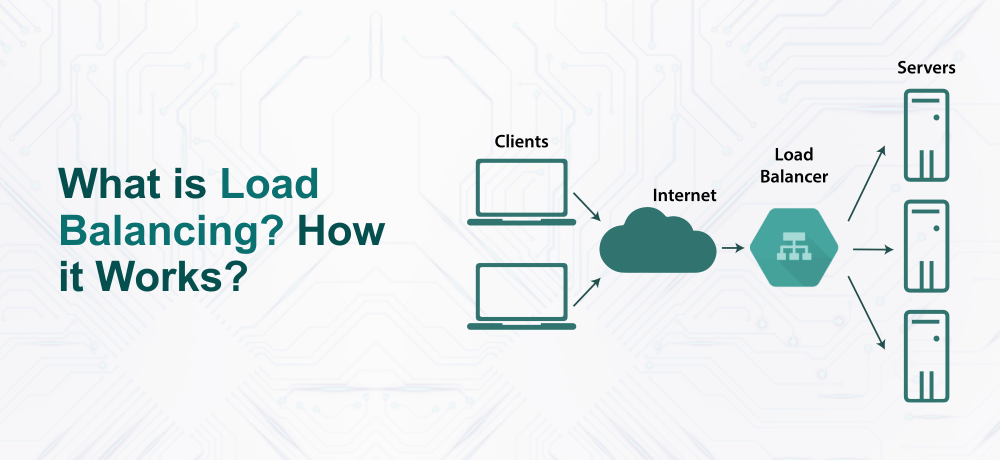
    Load balancing refers to the sharing of high network traffic among various servers, collectively known as server pool or server farm. A load balancer ensures that the client requests are routed to the available servers so as to spread the workload uniformly. Basically, the load balancer improves the responsiveness and availability of the website. Load balancing is applicable to the 4-7 layers of the total 7 layers in the OSI model.

    Mainly it does traffic redirection after checking the availability of the servers, the server is online or not. Offers scalability to add and remove servers from the server pool depending on the website requirements.

    Having said that, let’s see the importance of load balancing.

    Importance of Load Balancing

    Load balancing plays an important role in maintaining the flow among servers and visitor’s devices/systems.

    Let’s see what are the advantages of load balancing:

    Reduced downtime and Reliability: A load balancer is beneficial in managing the traffic surge, distributing high network traffic among several servers, prevent server overloads. So, even if one of the servers goes down, the load balancer can instantly redirect the site to another available server. This results in reduced downtime.

    Scalability: Load balancer allows website scaling. You can add the server to manage more website traffic. With a load balancer, you can evenly distribute the load among various servers and thereby prevent performance drop of your website.

    On the other hand, if a load balancer isn’t configured on your server, the servers won’t handle the traffic evenly. This means that your visitors will see sluggish website performance or won’t be able to access your site.

    Website Security: The load balancer offers protection against DDoS attacks. Particularly its off-loading function routes the attack traffic to a public cloud provider rather than a private server.

    With that being said, now let see the working of a load balancer.

    Working of a Load Balancer

    A load balancer operates between the clients and the servers. Whenever a load balancer receives the request from the client, it identifies the server where it should forward the request then routes the request to the server.

    The load balancer takes off the stress from high traffic server by distributing the request to the available servers. Dynamically add or remove the server based on the traffic demand.

    Additionally, the load balancer offers failover along with a performance boost. It routes the workload to a backup server from a failed one. Thereby eliminating the impact on end-users.

    Conclusion

    We hope with this article, you understood what is load balancing and the working of load balancing.

    Backups are essential for your website. It can help you save your website against disaster. We recommend our Managed WordPress Hosting plans that offer free backups along with optimal website performance and 24/7 instant support.

  • Comprehensive Guide on Working of Cloud Server

    Comprehensive Guide on Working of Cloud Server

    This article explains what a cloud server is, the working of a cloud server, its benefits, and things to consider before migrating to the cloud. So let’s get started!

    The cloud server is a robust virtual server executing in a cloud computing environment. This type of server is built, hosted, and delivered through a cloud computing platform on the internet. With a hypervisor, a physical server is partitioned into various virtual servers. These virtualized servers contain all the software that is needed to run as an individual unit.

    Now, let’s see the working of the cloud server

    Working of the Cloud Server

    As we discussed above, a physical server is partioned to multiple virtual servers with the help of software called a hypervisor.

    The hypervisor pools the physical server’s resources to form either one or more virtual servers. Then, the resources of virtual servers are delivered to the organization/s through the cloud.

    One such cloud service where hosting infrastructure like virtual servers, storage and networking, and storage resources are offered is called IaaS.

    Basically, cloud signifies cloud computing where multiple virtual servers are connected to share the load. This allows distributing complex processes to the smaller systems instead of utilizing one powerful system to compute complex processes.

    Now, as we have discussed working on the cloud server, have a look at the types of cloud models.

    Types of Cloud Deployment Models

    Cloud deployment models are usually categorized into 3 models namely(Public Cloud, Private Cloud, and Hybrid Cloud). Deployment models differ based on how they are implemented, the type of hosting, and who is accessing it.

    Now, let’s see those 3 models:

    Public Cloud

    In this type of cloud deployment model, the cloud service provider offers shared resources i.e server resources are shared among multiple users. A public cloud is an ideal option for organizations or individuals who don’t want to spend much on IT infrastructure.

    Private Cloud

    Unlike the public cloud, the private cloud offers dedicated server resources. So, here you get better security as there are no other users on the server except you. But, this security comes at a higher price than the public cloud. Additionally, this is an unmanaged service meaning that you yourself need to manage the cloud server.

    Hybrid Cloud

    Hybrid Cloud incorporates characteristics of both public and private cloud. With this cloud model, you can easily share data among the public and private cloud environments. You get the scalability with this model to meet the growing needs of the business. Hybrid cloud offers the security of private cloud alongside the power of the public cloud.

    Having said that, let’s see the benefits of the Cloud Server.

    Cloud Server Benefits

    Below, we have listed the benefits of cloud servers:

    • Enhanced Server Uptime: Due to interconnected servers, there is no single point of failure. So, even if any of the server goes down, you have the backup server wich ensures everything runs smoothly.

    Cost-Effective:

    Cloud follows a pay-as-you-go model so you need to pay only for the resources that you consume.

    Resources Scalability:

    With the cloud, you get better resources scalability. At any time, you can add the resources of your server like RAM, storage, bandwidth, etc.

    Additionally, you can check out our Cloud Linux VPS Hosting plans that offer multi-processor KVM/OpenVZ instances and full root access.