Category: Technology

  • Best Web Hosting | Benefits of SSD for Your Website

    Best Web Hosting | Benefits of SSD for Your Website

    The functionality and dependability of your website are essential for success in the modern digital environment. Choosing the best web hosting option can greatly impact your site’s performance, user experience, and ultimately, business outcomes, whether you run a blog, e-commerce store, or corporate website. The utilization of SSD (Solid State Drive) disks, which have several advantages over conventional HDD (Hard Disk Drive) storage, is a vital component of premium web hosting. This article explains the benefits of SSD storage for websites and how it can improve web hosting.

    Unmatched Speed and Performance

    The success of your website is largely dependent on its speed. According to studies, a single second of latency in page load time can result in a 7% decline in conversions, an 11% loss in page views, and a 16% drop in customer satisfaction. SSD drives are renowned for their quick data recovery, which results in quicker page loads.

    SSDs employ flash memory to read and write data far faster than standard HDDs, which rely on mechanical components to do so. Because it guarantees a more seamless user experience even with large loads, this speed is especially advantageous for websites with huge traffic levels. Faster load times are beneficial for both user experience and SEO rankings since search engines like Google give preference to sites that load quickly.

    Enhanced Reliability and Durability

    The mechanical nature of typical HDDs, which renders them prone to wear and tear over time, is one of the main causes for concern. Every website owner fears data loss and downtime, which can result from the moving parts in HDDs failing from heat, physical damage, or just from prolonged use.

    SSDs, on the other hand, are significantly more dependable and durable because they don’t contain any moving parts. They are much less prone to data corruption or drive failure since they are less vulnerable to environmental influences and physical damage. This dependability guarantees that your website will continue to function with little interruption, protecting the good name of your company and upholding client confidence.

    Energy Efficiency and Reduced Costs

    When it comes to electricity consumption, web hosting companies that utilise SSDs typically use less than those that use HDDs. Because SSDs don’t need power-hungry motors to spin disks or operate read/write heads, they are more energy-efficient. Because of its energy efficiency, data centres require less cooling and spend less money overall. Since these savings are frequently transferred to clients, SSD-based hosting is not only a more economical but also environmentally friendly choice.

    Better Handling of Databases and Applications

    The performance benefits of SSDs are particularly noticeable for websites that rely significantly on databases and dynamic content, such as e-commerce platforms or content management systems like WordPress, Joomla, or Drupal. SSDs process data faster and provide faster access to your website’s content than HDDs because they are far more efficient at handling complicated transactions and database queries.

    Future-Proofing Your Website

    Expectations for website performance will only rise as technology develops more. By selecting web hosting with SSD disks, you future-proof your website against the demands of tomorrow’s online traffic and application requirements, in addition to optimizing it for today’s performance standards.

    Conclusion

    There are other factors to consider than pricing or storage space when selecting the best web hosting. The kind of storage your hosting company utilizes can have a big impact on the functionality, dependability, and speed of your website. SSD drives are an essential part of contemporary web hosting solutions because they provide unrivaled benefits in these domains. Choosing SSD-based hosting will ensure that your website provides users with an exceptional experience, is durable when faced with technical difficulties, and stays competitive in the always changing online market.

  • Impact of Artificial Intelligence on Small Businesses

    Impact of Artificial Intelligence on Small Businesses

    Artificial Intelligence (AI) has rapidly transitioned from a futuristic concept to a tangible reality, reshaping various industries and revolutionizing how businesses operate. While large corporations were the early adopters, AI is increasingly making its mark on small businesses, offering tools and technologies that can significantly enhance efficiency, customer experience, and competitive advantage.

    Streamlining Operations and Reducing Costs

    One of the most significant impacts of AI on small businesses is the ability to streamline operations and reduce costs. AI-powered tools can automate routine tasks such as scheduling, inventory management, and data entry. For example, AI-driven chatbots can handle customer inquiries 24/7, reducing the need for a large customer service team. This not only cuts labor costs but also ensures that customers receive prompt responses, enhancing overall satisfaction.

    In addition, AI can optimize supply chain management by predicting demand, managing stock levels, and identifying the most cost-effective logistics solutions. This predictive capability helps small businesses avoid overstocking or stockouts, reducing waste and improving profitability.

    Enhancing Customer Experience

    AI enables small businesses to provide a personalized customer experience that was once only possible for larger companies. By analyzing customer data, AI can offer insights into buying patterns, preferences, and behavior. This information allows businesses to tailor their marketing efforts, recommend products, and create personalized offers that resonate with individual customers.

    For instance, AI-powered recommendation engines, similar to those used by e-commerce giants like Amazon, can suggest products based on a customer’s previous purchases and browsing history. This level of personalization not only boosts sales but also increases customer loyalty by making customers feel valued and understood.

    Improving Decision Making

    Data-driven decision-making is an additional domain where AI excels. Small businesses can leverage AI to analyze vast amounts of data quickly and accurately, uncovering patterns and trends that might be missed by human analysts. This capability is particularly valuable in areas such as marketing, where AI can identify the most effective channels, content, and strategies to reach target audiences.

    AI plays a vital role in financial management. By analyzing financial data, AI can predict cash flow, identify potential financial risks, and provide recommendations for budget optimization. This allows small business owners to make informed decisions that enhance financial stability and growth.

    Boosting Marketing Efforts

    Marketing is a critical component of any business strategy, and AI offers small businesses powerful tools to enhance their marketing efforts. AI can automate and optimize various aspects of digital marketing, including ad targeting, content creation, and email marketing campaigns. For example, AI can analyze social media data to identify the best times to post, the most engaging content types, and the demographics most likely to respond to specific messages.

    Furthermore, AI can help small businesses understand their customers better through sentiment analysis, which interprets customer feedback and reviews to gauge public perception. This insight allows businesses to adjust their marketing strategies in real time, ensuring they remain relevant and effective.

    Facilitating Innovation

    AI fosters innovation by enabling small businesses to experiment with new ideas and approaches with reduced risk and cost. For example, AI can simulate market conditions to test the potential success of a new product or service before its launch. This helps businesses refine their offerings and strategies based on predictive insights rather than guesswork.

    Additionally, AI can enhance product development by providing insights into customer needs and preferences, allowing businesses to create products that are more likely to succeed in the market. This capability levels the playing field, giving small businesses the same innovative edge as their larger counterparts.

    Overcoming Implementation Challenges

    Despite its benefits, implementing AI can be challenging for small businesses due to cost, complexity, and lack of expertise. However, the rise of user-friendly AI solutions and platforms tailored for small businesses is mitigating these barriers. Many AI tools now come with intuitive interfaces and offer scalable pricing models, making them accessible to businesses of all sizes.

    Moreover, partnering with AI service providers or hiring consultants can help small businesses navigate the complexities of AI implementation, ensuring they can fully leverage its potential without overwhelming their resources.

    Conclusion

    The impact of artificial intelligence on small businesses is profound and multifaceted. By streamlining operations, enhancing customer experience, improving decision-making, boosting marketing efforts, and facilitating innovation, AI offers small businesses unprecedented opportunities for growth and competitiveness. As AI technology continues to evolve and become more accessible, its adoption among small businesses is likely to accelerate, driving further transformation and success in the years to come.

  • Top Reasons to Choose Bare Metal Server

    Top Reasons to Choose Bare Metal Server

    Choosing the correct server infrastructure is a critical decision that can impact your future success. In this blog post, we discuss five key reasons why deploying bare metal for your next workload can give you a competitive edge.

    But what exactly is Bare Metal?

    Bare metal server, also known as dedicated servers, offer users the option to rent private servers from a hosting provider that are not shared with other tenants. With complete control over hardware and the ability to select your operating system, bare metal technology allows you to customize your hardware and software for your specific applications and data workloads. This eliminates the challenges of sharing server infrastructure with others, ensuring maximum efficiency, reliable connectivity, and an optimized server environment.

    Despite the growing popularity of cloud computing, it is essential to recognize the advantages of utilizing bare metal directly for your organization. Bare metal solutions provide opportunities to handle unexpected, critical workloads for businesses with limited resources.

    Here are the top 5 reasons why bare metal could be the ideal choice for you!

    Customize your ideal space

    As your business expands, your infrastructure needs will evolve. A more tailored and specialized solution may become essential for your workload. This is why bare metal stands out as a prime choice for long-term data storage and transfer. It provides robust power, adaptable structure, and extensive customization options. Bare Metal solutions offer great flexibility and can be finely tuned to suit a variety of workload demands, including server setups, RAM, SSD storage, bandwidth choices, and more.

    Through Bytenap Cloud Services, we collaborate with your business to optimize your hardware and connectivity setups according to your precise requirements. Whether you require one server or a thousand, we tailor the solution to meet your unique needs.

    Access to exclusive physical hardware

    Bare metal servers allocate all computing resources to a single client, enabling you to run your most intricate applications and data-heavy workloads with dedicated physical hardware designated exclusively for your organization.

    Being the exclusive user of a dedicated server ensures that you can avoid potential data breaches commonly associated with shared servers. The administrators managing your bare metal server have complete authority over the environment and hosting infrastructure, covering costs, resources, and security aspects.

    This guarantees that your business does not have to share hardware access with other users, providing you with full control over the hardware, heightened security, and the assurance that your infrastructure is securely managed. Opting for a dedicated server ensures that all resources are exclusively allocated to your business, giving you the flexibility to utilize them as needed.

    High Availability

    Hosting physical server hardware in-house can lead to unpredictable spikes in usage on your server infrastructure. This situation may result in being constrained by limited capacity or paying excessively for unused resources. Enter bare metal – it provides complete control of your localized set-up and access to performance and usage analytics. This empowers your IT team to optimize and scale your server infrastructure as needed. Bare metal Server offer a convenient option for managing deployment costs and overall server performance, delivering significant savings on compute resources. It also allows for easy scaling and upgrading of IT resources, making it an ideal choice for small to medium businesses.

    With Bytenap Cloud Services, your enterprise will benefit from 24/7 support from our team of technical experts.

    Unmatched speed with heightened security

    Industries needing top-tier data security, power, and consistent performance will most likely utilize bare metal systems for their infrastructure. Compared to virtual environments, bare metal servers don’t require multiple software layers, meaning there’s one less barrier between you and your physical hardware for everyday use – resulting in robust performance and high-speed connectivity.

    Additionally, you’ll enjoy enhanced security as your physical hardware is isolated from other tenants, eliminating potential cybersecurity risks and downtime issues. The high-speed, low latency connectivity and reliable server security will revolutionize your business.

    Reduced initial capital expenditure

    Managing hardware in-house incurs various costs for procurement, maintenance, and upgrades. These costs can be avoided by opting for bare metal offerings. This is typical in traditional IT business models, where enterprises must purchase costly technology assets and equipment outright. The challenge with this CapEx (Capital Expenditure) model is that enterprises are then responsible for managing and maintaining these technologies until they become obsolete.

    This shift in businesses towards OpEx (Operational Expenses) models means that businesses now have the option to engage a hosting provider who owns the physical servers and hardware. This allows clients to rent the equipment operationally, meaning they only pay for the operational costs, eliminating the immediate need for costly technology investments.

    Compared to other deployment solutions, bare metal servers are more cost-effective and offer additional resources, high-performance computing, and predictable billing from a bandwidth cost perspective.

    Conclusion

    cms.bytenap.com/ offers a cost-effective solution for businesses looking to streamline their IT infrastructure while maintaining control and flexibility. By leveraging their bare metal solutions, businesses can optimize their IT budget and gain a competitive advantage in the market. With the ability to easily monitor and regulate bandwidth, businesses can ensure that their hosting account meets their specific needs without overspending. Trust cms.bytenap.com/ to help enhance efficiency and overcome obstacles in the digital landscape.

  • Step-by-Step Guide | Unzipping a ZIP File in Ubuntu Linux

    Step-by-Step Guide | Unzipping a ZIP File in Ubuntu Linux

    Introduction

    Have you ever pondered over the seamless handling and transmission of bulky files by individuals and organisations? The secret behind this efficiency lies within the realm of zip files. Picture a zip file as a versatile envelope that can neatly contain your disorganized documents. Not only does it serve as a vessel, but it also automatically compresses its contents, ensuring a snug fit into any storage space. This compression drastically minimizes file size, facilitating effortless sharing across diverse networks. Fun fact: A compressed file belongs to the archive file format family. Employing compression algorithms, it boasts numerous advantages, including enhanced data security, simplified sharing, and reduced storage demands. In this article, we’ll walk you through the process of installing the zip and unzip utility. Furthermore, a dedicated section outlines steps for unzipping a ZIP File in Ubuntu Linux. Let’s delve in!

    Install the Zip and Unzip Utility in Ubuntu

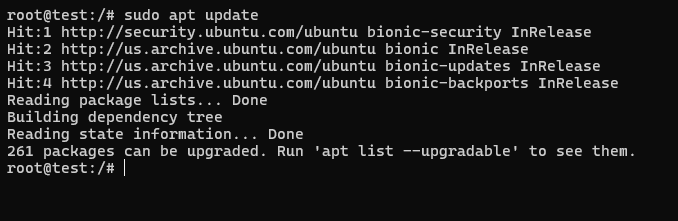
    Before downloading the utility, it’s strongly advised to acquaint yourself briefly with its functionalities. This command-line tool excels in both compressing and decompressing files and directories effortlessly, while adeptly handling multiple files concurrently. Armed with this basic understanding of the zip and unzip utility, let’s proceed to the download steps. Following this, we’ll delve into the process of unzipping a ZIP File in Ubuntu Linux. To initiate, open the terminal window by pressing Ctrl+Alt+T. Ensure you have an updated package before downloading the utility. Simply execute the command provided below.

    sudo apt update

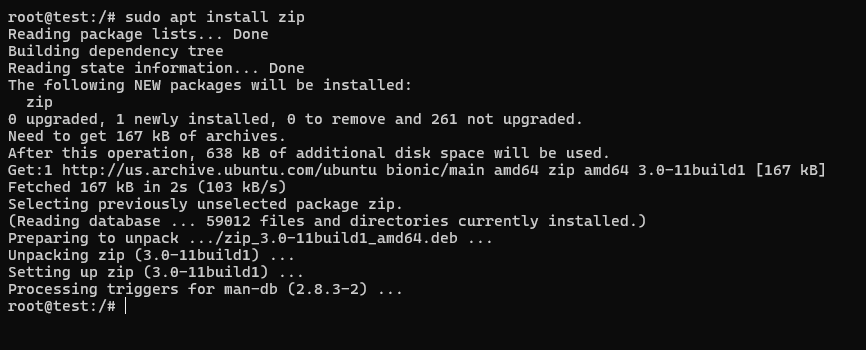
    • After the package is updated, enter the below command to install the utility.

    sudo apt install zip

    • Once you have installed the utility, simply enter the user account password and press enter.
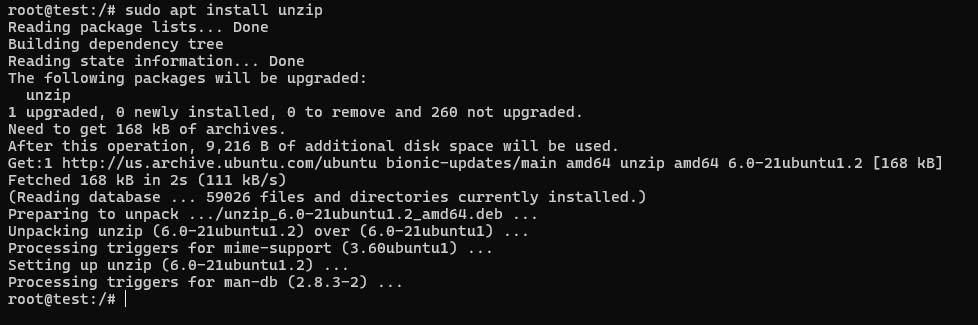
    • Your zip utility is installed now; we will install the unzip utility using the code below.

    sudo apt install unzip

    • Again enter the user account password and press enter.
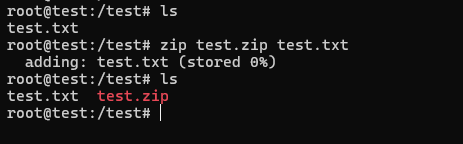
    • The installation is complete, and you just have to verify the installation by creating a zip file.
    • Use the below code to create and unzip a .zip file in Linux.

    # Create a new ZIP file with a test.txt file inside

    zip test.zip test.txt


    # Unzip the test.zip file

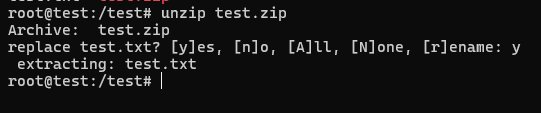
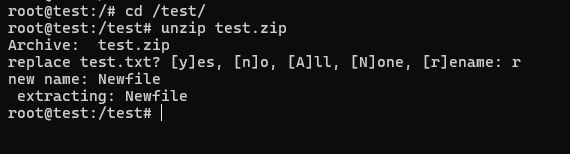
    unzip test.zip

    Once you have successfully executed the unzip commands in Linux, you can confirm that the process has been completed.

    Unzip a File Using the Command Line

    The process of unzipping a .zip file in Linux is as easy as zipping it. Follow these steps to learn the unzipping process quickly.

    • Press Ctrl+Alt+T to open the terminal window.
    • Now you need the correct path of the zip file to proceed further. Use the below command to navigate the zip file in the terminal window.

    cd ~/Downloads

    • Replace the’`/downloads’ with the correct path of your zip file.
    • Once the navigation is done properly, simply enter the below command to unzip a .zip file in Linux.

    cunzip example.zip

    • The final step is verifying the unzipping process by personally visiting the directory where the extraction process occurred.

    Other Linux Unzip Commands

    1. How to Unzip Multiple ZIP Files?

    The above utility, which we have just downloaded through a terminal window, is capable enough to unzip multiple files. All you have to do is open the terminal window through Ctrl+Alt+T and navigate the zip files through the command ‘cd ~/Downloads.’ Make sure to replace the ‘~/downloads’ with the actual path of your zip files. Now you just have to invoke the terminal window loop through the code below.

    for zip_file in *.zip; do unzip "$zip_file"; done

    This command will start a process where all the zip files of the current directory will be unzipped swiftly.

    2. How to Test if a ZIP File is Valid

    To test if a ZIP file is valid and not corrupted, you can use the “unzip” command with the “-t” option. This option allows you to test the integrity of the ZIP file without actually extracting its contents. Here’s how you can do it:

    • Open a terminal window in Linux.
    • Navigate to the directory where the ZIP file is located using the “cd” command. For example, if the ZIP file is in the “Downloads” folder, use the following command:

    The “unzip” command will check the ZIP file’s integrity and display the result. If the ZIP file is valid and not corrupted, it will show a message indicating that the test was successful. On the other hand, if the ZIP file is corrupt or invalid, it will show an error message indicating the issue.

    Conclusion

    This guide will walk you through installing the zip and unzip utility on Ubuntu Linux, along with utilizing the command line to unzip .zip files. The zip utility compresses files and directories, whereas unzip extracts contents from zip files. Linux users frequently rely on unzipping files to efficiently handle substantial data volumes and streamline information sharing across networks. With the zip and unzip utilities at your disposal, managing archives and extracting their contents becomes a seamless and uncomplicated endeavour.

  • How to change file permissions in Linux

    How to change file permissions in Linux

    How to change file permissions in Linux

    In the world of Linux, understanding how to modify file permissions is crucial for
    maintaining system access and ensuring security. By properly managing file permissions,
    you can control who can read, write, or execute files, thereby safeguarding your sensitive
    data and applications.

    In this guide, we will explore the step-by-step process of changing file permissions in Linux.
    Whether you are using Ubuntu, CentOS, or Red Hat Enterprise Linux, we will focus on
    utilizing the command line interface to make these modifications.

    Key Takeaways:

    • Changing file permissions in Linux is essential for system access and security.
    • Linux is an open source operating system based on the Unix-like system.
    • Mastering the command line interface is crucial for modifying file permissions in Linux.
    • Popular Linux distributions like Ubuntu, CentOS, and Red Hat Enterprise Linux can benefit from these file permission modifications.
    • Properly managing file permissions ensures the integrity and safety of your data and applications.

    Understanding Linux file permissions

    Before we delve into the steps of changing file permissions in Linux, it’s important to have a basic understanding of how file permissions work in this open-source operating system. Linux is an open source operating system that is built on the Unix-like system. At the heart of Linux is the kernel, which acts as the core of the operating system.

    The Linux Kernel

    The Linux kernel is the foundation of the entire operating system. It is responsible for managing hardware resources, providing low-level services, and enabling communication between software and hardware components. The kernel acts as a bridge between the hardware and the software layers, allowing the operating system to function smoothly.

    Unix-Like System

    Linux is classified as a Unix-like system because it shares many similarities with the Unix operating system. Unix-like systems are designed to be multi-user, multitasking, and provide a hierarchical file structure. These systems prioritize stability, security, and performance, making them ideal for a wide range of applications.

    Open Source Operating System

    Linux is known for being an open-source operating system, which means that its source code is freely available and can be modified and distributed by anyone. This open nature fosters collaboration, innovation, and customization, leading to a vibrant community of developers and users who contribute to the continuous improvement of the Linux ecosystem.

    By having a grasp of the Linux operating system, its open-source nature, and the role of the kernel, you will be better equipped to understand and navigate the process of changing file permissions in Linux.

    Steps to modify file permissions in Linux

    Now that we have a grasp of the basics, let’s explore the step-by-step process of modifying file permissions in Linux. This guide will cover different methods that can be used on popular Linux distributions such as Ubuntu, CentOS, and Red Hat Enterprise Linux. We will focus on using the command line interface to make these changes.

    Method 1: Using the chmod Command

    The chmod command is a powerful tool for modifying file permissions in Linux. It allows you to change the read, write, and execute permissions for the owner, group, and others.

    The following table provides an overview of the most commonly used file permissions:

    Permission Symbol Permission Meaning Octal Value
    r Read 4
    w Write 2
    x Execute 1

    To modify file permissions using the chmod command, follow these steps:1. Open the command line interface on your Linux server.
    2. Locate the file whose permissions you want to modify.
    3. Use the chmod command, followed by the desired permission symbols and the file name or path, to change the permissions. For example, to give the owner read and write permissions, the group read permission, and others no permissions, you would use the command:

    chmod 640 file.txt

    4. Verify that the permissions have been successfully modified by using the ls -l command to list the file details.

    Method 2: Using the chown Command

    The chown command is used to change the ownership of files in Linux. By changing the owner, you can also modify the file permissions.

    To change the ownership and permissions of a file using the chown command, follow these steps: 1. Open the command line interface on your Linux server.
    2. Locate the file whose ownership and permissions you want to modify.
    3. Use the chown command, followed by the username or user ID, and the file name or path, to change the ownership. For example, to change the ownership to the user “john” and the group “users”, you would use the command:

    chown john:users file.txt

    4. Verify that the ownership and permissions have been successfully modified by using the ls -l command to list the file details.By following these steps, you can easily modify file permissions in Linux using the command line interface. This gives you the flexibility to manage system access and ensure the security of your files and directories.

    Conclusion

    Mastering the art of changing file permissions in Linux is essential for ensuring the security and integrity of your system. By understanding and implementing the steps outlined in this guide, you can effectively manage file access and protect your valuable data and applications.

    Linux file permissions provide a powerful system for controlling who can read, write, and execute files. By utilizing the command line interface, you have greater control over the permissions assigned to different users and groups.

    Remember, maintaining strong system access controls is crucial for safeguarding sensitive information and preventing unauthorized access. By regularly reviewing and adjusting file permissions, you can minimize the risk of security breaches and maintain a secure computing environment.

  • 5 Reasons to Consider VMware over Hyper-V

    5 Reasons to Consider VMware over Hyper-V

    Here’s a comprehensive guide on 5 reasons to consider VMware over Hyper-V.

    People often get confused between VMware Vs Hyper-V, which virtualization technology they need to choose. The selection of virtualization technology solely depends on the type of business. Not all virtualization solutions are built equal. So, a solution that proves to be efficient for one business isn’t necessary for another business.

    Virtualization is the process of creating virtual instances of a physical with the help of a hypervisor.

    For instance, a dedicated server is capable of running several applications or host several websites. However, if any of those applications or websites observe a sudden rise in traffic or require additional storage, then it will compromise the performance of other websites or applications on that particular server.

    In a few cases, the whole server may face downtime resulting in the shutting down of websites or applications even those who weren’t using many resources.

    On the other hand, with the help of virtualization technology, one can create individual servers. As a result, the resources can be distributed. So, the application or website that uses high server resources won’t be affecting other tenants.

    Additionally, virtualization is an ideal way to secure the network, get the most out of your server resources, and that too without the need to invest in new hardware. You also get dedicated, and separate resources that are ideal to run task-oriented operations.

    VMware and Hyper-V are two of the most widely utilized virtualization software which we also are discussing in this blog post. Let’s understand the definition of these widely popular virtual technologies. Later, we will discuss 5 reasons to consider VMware over Hyper-V.

    What is VMware?

    VMware was the first virtualization software to be launched in the market in 1998. VMware software is compatible with both Windows and Linux operating systems and can be used to create virtual servers. Resources can be scaled according to the needs of applications or websites. Thereby offering utmost flexibility to the business of all sizes.

    With VMware, you can easily run multiple operating systems on the same host machine or server. No need for two separate machines to run two server Operating Systems. This is a result, minimizes the cost of the data center.

    The best part is that you can enhance the efficacy of current hardware and extended the life of legacy software with the help of virtualization.

    What is Hyper-V?

    Hyper-V is Microsoft’s virtualization solution that helps to create Windows-powered virtual machines. Released in 2008, it was initially named Windows Server Virtualization. It is capable of virtualizing both operating systems as well as server components.

    Hyper-V is also called a bare-metal hypervisor as it runs directly on the hardware or any other virtualized instances.

    Hyper-V is mainly available in three versions:

    • Hyper-V on Windows 10
    • Hyper-V Servers
    • Hyper-V for Windows Servers

    Hyper-V on Windows 10 is just similar to running virtualization software on your Windows 10 desktop or laptop. Other virtualization software is Oracle Virtualbox, VMware Workstation Player, etc.

    Hyper-V Servers is a server that runs Microsoft’s Hyper-V virtualization technology to create and manage virtual and dedicated server instances.

    Last but not the least, the Hyper-V for Windows Servers is an add-on that is readily available to be installed on any Windows Server OS.

    As Hyper-V is a product of Microsoft, it is specially designed to offer a seamless experience while working with other Microsoft’s services and products.

    Hyper-V is ideal for Windows users as the Microsoft ecosystem allows better performance and manageability.

    5 Huge Reasons to Choose VMware

    Below are 5 key reasons to consider VMware over Hyper-V:

    Exceptional File System

    Talking about the storage and clustering capabilities of both the virtualization solution, they are efficient in their own fields. However, Hyper-V’s REFS or Resilient File System is quite complex to use whereas VMware’s file system is quite simple as and when organization scales.

    Better Compatibility of Operating System

    Hyper-V is just limited to Windows, Linux, and some other operating systems whereas VMware not only supports Linux and Windows but also the macOS and Unix.

    Most importantly, modernized legacy applications and systems don’t work with Microsoft’s Hyper-V. This is quite disappointing especially when the capabilities of legacy systems are needed for particular operations.

    Enhanced Flexible Security

    The security of Hyper-V is managed through Active Directory. It’s an excellent choice for users that want to leverage the Microsoft ecosystem.

    However, it is just limited to Windows only. So, if you are planning to work on macOS or Unix server, you need to use VMware as virtualization technology.

    VMware offers better security and flexibility as they don’t need to rely completely on Microsoft’s range of security products.

    Better Provisioning and Scalability

    Provisioning and scalability is a crucial factor while picking a virtualization technology.

    Modern applications need more computing power to run ideally. If we talk about the scalability and provisioning of both these technologies;

    Hyper-V is optimized for the provision of physical memory whereas VMware offers flexibility on how many CPUs can be deployed per host. So, VMware is a more ideal option in situations where you need more processing power to run complex modern applications.

    Ongoing Management and Utilization

    In VMware, no operating system is crucial for controlling the management components. Additionally, security patches aren’t needed for controlling layer components.

    Conclusion

    We hope this article helped you understand 5 reasons to consider VMware over Hyper-V.

    Summary:

    Hyper-V is dependant on the Windows ecosystem. Whereas VMware is compatible with multiple operating systems which makes it flexible to use and ideal for various use cases and environments.

    Additionally, we offer Cheap Linux VPS Hosting plans, which come with a powerful and robust VPS server for optimal website performance.

  • 5 Unknown Benefits of Data Center Virtualization

    5 Unknown Benefits of Data Center Virtualization

    The importance of Information Technology in online business is increasing with each passing day. Regardless of the market or sector, IT is a competitive differentiator. The era of on-premise servers is gradually passing away as more and more scaling businesses are relying on the benefits of data center virtualization.

    Gone are the days when organizations had old desktops and a server in the closet. Softwares such as Windows Exchange and QuickBooks are completely mobile, connected at all times, and cloud-native. The success of a business and its future growth are highly dependant on the powerful technological base.

    What is Virtualization?

    Virtualization is the process of turning a physical server into several virtual servers with the help of a hypervisor. Virtualization allows businesses to run several applications in multiple environments on the same physical server.

    For more details on what is a hypervisor, you can read our blog post.

    For instance, earlier, if you had four applications that needed four Gigabytes of memory and 16 Gigabytes of disk space, you would require four distinct servers with these specifications.

    On the other hand, in the modern-day, a single server having 16 Gigabytes of memory and 64 Gigabytes of disk space can be segregated or virtualized to house all of the four applications, each having its own dedicated environment.

    The Benefits of a Virtual Data Center (VDC)

    Just like private servers can be virtualized, so too can whole data centers. In a virtualized data center, the whole pool of physical servers or cloud resources can be virtualized to offer businesses a more enhanced technology with several benefits.

    Though there are few cases where having a physical server or data center makes sense. However, in the majority of use cases, virtual data center proves to be more beneficial.

    Now, let’s discuss the five key benefits of data center virtualization for your business.

    Excellent Return on Investment (ROI)

    Virtualization technology is used to capitalize the available resources in a physical machine.

    When we talk about the virtual data center, its resource efficiency is quite similar to a single physical server that is virtualized to run four or even more virtual machines. Moreover, a virtual data center offers the resources you need without having to take the burden of paying for unused hardware, connectivity, or electricity.

    The ROI for a virtual data center is remarkably higher than owning and managing your own physical server racks.

    Minimal Cost for Maintenance and Management

    With virtualization, the resource allocation in virtual servers is made more effective thereby minimizing the cost of maintaining and managing those servers.

    Additionally, you can save on physical space costs, power, security, connectivity, and power as well as server and network admins.

    In most cases, virtual data centers are offered as Infrastructure-as-a-Service(IaaS) which means that you just need to manage the operating system. Anything below the OS(hardware, bandwidth) is managed by your IaaS provider. This means that your team can concentrate on core competencies rather than managing a data center.

    Ease of Operation

    Yet another advantage of the data center visualization is unified data management from a single application.

    In short, provisioning of new servers, creating and restoring backups, managing inventory counts, and device discoverability are all streamlined and simplified.

    For instance, you can get software updates or provision of new instances with just a few clicks rather than starting from scratch with a physical machine.

    Enhanced Security

    Virtual servers offer better security and quicker reprovisioning, which is not always the case with a physical data center.

    For instance, while using physical hardware, any misfortunate events like a flood or power cut can take hours or even days to fix. However, with a VDC, an image of the affected system can be provided to a new virtual machine with just a few clicks.

    Moreover, as the servers are virtualized, you don’t have to worry about the security of gates, locks, and fences for securing the data center.

    Agility and Flexibility

    Another benefit of data center virtualization is that it offers companies of all sizes the most valuable trait in business; the capability to move quickly also known as IT agility.

    Below, we have provided a few examples demonstrating the benefits of flexibility and agility by using data center virtualization:

    • Capital expenditures on servers that will soon be obsolete are moved to OpEx and its technology are updated regularly. 
    • With a virtual data center, a new location can come online in just a few minutes compared to the elongated process of setting up a new data center. 
    • Untouched resources and servers can be revised within few minutes, no reprovisioning or recycling needed. 

    Conclusion

    We hope that with this article, you may know have understood the 5 Unknown Benefits of Data Center Virtualization

    Additionally, you can check out our Cloud Linux VPS Hosting plans that offer multi-processor KVM/OpenVZ instances and full root access.

  • How Fast PHP And MySQL Can Boost Website Speed (Beginner’s Guide)

    How Fast PHP And MySQL Can Boost Website Speed (Beginner’s Guide)

    Ever got puzzled what’s the impact of PHP and MySQL on your site speed?

    WordPress is written in PHP programming language and utilizes MySQL as its database. Both of the programs operate on your web server hence will impact the overall performance of your web server.

    In this blog post, we will discuss how fast PHP and MySQL can boost website speed. Additionally, we will also discuss how you can enable it for your site.

    How Faster PHP + MySQL Affects WordPress Performance

    WordPress generally written in PHP, is a programming language that runs on your web server. It stores your site data in a MySQL database.

    Both PHP and MySQL will be running on your web server as an application. While more and more users visit your site, PHP and MySQL will eat more server resources.

    The majority of the sites address this by utilizing a WordPress caching plugin. But, processes such as .htaccess rules, PHP extensions, and SQL queries can yet increase the load on the server.

    Faster PHP and MySQL optimize these regular processes to improve their performance and speed The more traffic your site gets, the more of a performance improvement you will observe.

    This where Ultrafast PHP can prove to be beneficial.

    Meanwhile you can read our blog posts on:

    What is Ultrafast PHP?

    Ultrafast PHP is an optimized version of PHP built by the team at SiteGround.

    For high-traffic sites, Ultrafast PHP can boost the performance of a website by up to 30% and minimize the TTFB (time to the first byte) by 50%.

    The load on your web server will also be minimized and it will be able to run up to 20-30% more process while eating 15% less memory (RAM).

    With optimized PHP setup (Ultrafast PHP) that is optimize for your client’s unique needs.

    Who Requires Ultrafast PHP?

    If you have an online store or a website that has constant website traffic, then you require an Ultrafast PHP to help you boost performance.

    Ultrafast PHP is currently available to SiteGround users who have opted for GrowBig, GoGeek, and Cloud plans. Basically, these are the users who have busier sites that often exhaust resource limitations.

    This feature isn’t available to users that are using the old control panel. But, if your hosting account dashboard is utilizing SiteGround’s new client area and Site Tools control panel, then you will be able to enable Ultrafast PHP. Below, we’ll show you how it’s done.

    If you have a small business website or new blog that doesn’t have much traffic then you may not need Ultrafast PHP as the newest version of PHP is pre optimized for ideal performance. Hence, you need to ensure that you are utilizing the latest PHP version for your site.

    Also Read:

    • Easy Fix for “Your PHP installation appears to be missing the MySQL extension?”
    • MariaDB Vs MySQL: Difference Between Two Database Technologies

    How to Enable Ultrafast PHP on SiteGround

    It is quite simple to enable the Ultrafast PHP for your WordPress site on SiteGround. Your hosting account should at least meet the following criteria:

    • Your websites are hosted on SiteGround’s GrowBig, GoGeek or Cloud plans
    • Your account is utilizing the new client area and site tools control panel

    Just log in to your account and click on the sites menu on the top. Then, click the Site Tools button next to the site where you wish to enable Ultrafast PHP.

    From there, you need to click on the PHP Manager menu located under the Dev tab in the left column.

    Now, you need to click the Standard PHP option to change it. By doing so it will bring up a popup where you will be able to switch to Ultrafast PHP.

    Click on the left button to continue.

    After confirming, you will see a success message that will inform you that Ultrafast PHP has now been enabled for your site.

    Testing Your Website Speed after Enabling Ultrafast PHP

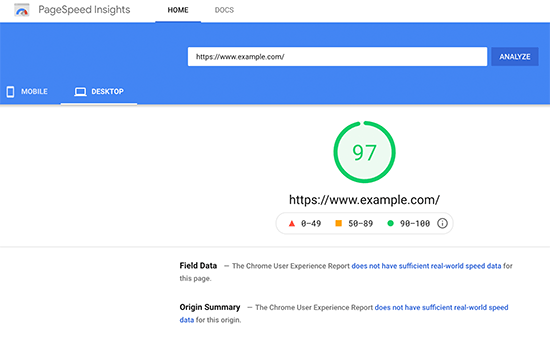
    You can make use of the Google Pagespeed insights or any other website speed testing tool to test your website performance.

    Pagespeed Insights
    Page Speed Insights

    You can have a look at metrics such as the server response time and time to first byte (TTFB) to measure the performance of your site.

    We hope this blog post helped you know how fast PHP and MySQL can boost website speed.

    ByteNAP offers services that will exceptionally enhance your website speed. Our best-selling Cheap Linux Web Hosting India plans are tailor-made for your business needs.

  • What is an APT Attack and How to Stop It?

    What is an APT Attack and How to Stop It?

    In this blog post, we will be discussing what is an advanced persistent threat or an APT attack and preventive measures against an APT attack. So, let’s get started!

    Advanced Persistent Threat: Brief Definition

    An advanced persistent threat or an APT attack is a cyberattack wherein a threat actor obtains access to a system or network and stays there for an extended time duration without being discovered or stay undetected. APT attacks are quite dangerous especially for enterprises because hackers can illegally obtain access to a company’s confidential data. Generally, APT doesn’t cause harm to the company networks or local systems. However, the aim of this type of cyberattack is most likely data theft.

    Suggested For Further Reading:

    • What is a DDoS attack and How to Mitigate DDoS Attacks?
    • What is a Firewall And 6 Different Types of Firewalls You Must Know

    While APT attacks are executed, it’s always in a sequence:

    • Develop Specific Strategy. Planned execution for performing data theft
    • Gain illegitimate Access. APT attacks are usually executed with the means of social engineering techniques that look for vulnerable targets. Spear phishing emails or malware from commonly utilized sites are later used to obtain access to credentials and the network. Attackers basically try to establish command and take control over the network once they successfully enter it.
    • Establish a Foothold and Probe. On establishing a presence in the network, attackers then move laterally and freely all over the environment exploring and planning the most suitable attack approach/strategy for the targeted data.
    • Stage the attack. The succeeding step is to develop the targeted data for exfiltration by centralizing, encrypting, and compressing it.
    • Take the data. At this stage, the data or information can easily be exfiltrated and moved across the world stealthily, unnoticed.
    • Persist until detected. This method is iterated for long durations through the attackers’ hidden stronghold till it is eventually identified.

    Indicators For APT Attacks

    As the main goal of the advanced persistent threat is to exfiltrate data, attackers don’t leave any trace of their malicious activity. Below are some of the most obvious indicators for APT attacks:

    • A sudden surge in logins at odd hours (logins at late night).
    • Identification of backdoor Trojan programs.
    • Huge unexplained data streams
    • Unexpected packets of aggregated data
    • The discovery of pass-the-hash hacking tools
    • Focused spear-phishing campaigns utilizing Adobe Acrobat PDF files

    APT Attack Prevention Tips

    Below we have provided few tips to protect against APTs:

    Educate All Employees About the Phishing Scams

    Several APTs begin with a fraudulent email that obtains access to your system/machine. Deploy a training program that educates employees on what to search for, what to do, and whom to ignore when they observe something fishy. Preventing an attack before it starts is an ideal way to eliminate risks.

    Ensure that All Security Patches Are Installed

    APT hackers are always in the search to identify any weakness in your system. This is why it is vital to run updates on all cybersecurity programs. If you restrain from installing updates or make delays in installing updates and patches then, you are leaving your company/organization exposed to attacks.

    Better Secure Your Most Sensitive Data

    Be more careful with your most confidential data. So, consider taking additional safety measures with your most confidential data. Don’t simply assign the admin rights to those accounts which don’t need it. Restrict the access to and editing abilities for data to minimize the possibility of accidental changes. Take security measures to safeguard your confidential data and keep them at a place where is difficult to find and copy.

    Conclusion

    We hope this article helped you know what an advanced persistent threat is and how to prevent an APT attack.

    Additionally, we at ByteNAP offer SiteLock Packages that are efficient in finding and fixing malware and also detecting suspicious activities (if present) on your website.

  • What Is Database-as-a-Service (DBaaS)?

    What Is Database-as-a-Service (DBaaS)?

    Database-as-a-Service (DBaaS) is a type of cloud computing service that enables companies to utilize a database without needing to set up physical hardware. Moreover, users don’t have to install software or hire staff members for the maintenance of underlying technologies (hardware and software).

    DBaaS eases the task of managing a database with its one-click operations. Additionally, it eliminates tedious tasks and offers agility for better and faster software development.

    Read further to learn what DBaaS technology offers.

    Database-as-a-Service Features

    In a conventional setup, the database server is an element of the on-premises computing infrastructure. The local staff at the data center is liable for the installation, protection, and maintenance of the database.

    Whereas on the other hand, DBaaS is a subscription service in which the provider handles and manages the hardware and offers the database as a private cloud service. The service provider manages the high-level database administrative tasks such as:

    • Initial Installation
    • Configuration Management
    • Database Maintenance
    • Performance Management
    • Backups
    • Cloud Monitoring (both for the database and the underlying infrastructure)
    • Patches and Upgrades
    • Disaster Recovery
    • Maintaining High Availability

    With so many tasks managed by the DBaaS service provider, the only responsibilities for DBaaS clients are using the database and managing its content. But, if the company is looking for more control over the database, the DBaaS provider can enable more user involvement.

    DBaaS eliminates the requirement for hiring and training a team to manage the database. Instead, one staff member controls the database instances with the help of an API and a management dashboard. The dashboard lets to do one-click operations that ease complicated processes like provisioning and specification.

    On receiving the console instructions from the user, the DBaaS platform provisions the database and returns a query-able endpoint. The user can utilize the code directly in the application.

    Database-as-a-Service allows users to operate a database with a common set of abstractions (primitives) without even the need to understand the implementations. For instance, a developer can add a database instance using the same set of API calls no matter what the database type is (MongoDB, Oracle, MySQL, etc.). The DBaaS model further presents simple and easy mechanics for:

    • Adding Users
    • Granting Permissions
    • Creating Schemas
    • Activity Tracking

    Also Read: What is a Database? Why Do We Need It?

    Setting Up DBaaS(Database-as-a-Service)

    Setting up DBaaS requires a cloud service and a database service. The most successful DBaaS providers are:

    • Amazon (Amazon Aurora, DynamoDB, Amazon RDS, SimpleDB)
    • Google Cloud (GC Bigtable, Google Cloud SQL, Google Cloud Datastore, GC Spanner)
    • Microsoft Azure (Microsoft SQL Database, MA Table Storage, Microsoft DocumentDB)
    • IBM Cloudant
    • Compose (IBM)
    • Oracle Database Cloud Service
    • MongoDB Atlas

    It is not mandatory that you need to opt for both cloud and database services from the same provider. You can opt for it from two different service providers. For instance, a team can set up Bare Metal Cloud for cloud requirements and combine that service with Microsoft’s SQL Server database. But, not all cloud platforms support all database management systems (DBMS), so make sure that you do some research before combining different providers.

    DBaaS Benefits

    DBaaS provides essential operational and fiscal benefits over the standard on-premise database.

    Developer Agility

    Standard database deployment is a complicated and multi-step process that needs several tasks. A standard deployment will look alike this:

    • A developer initiates a request in the ticketing system
    • The ticket stays in the queue till it gets to the top of priorities
    • The IT team assesses the ticket.
    • If the IT team identifies the request to be valid, then the team will assign the compute, storage, and networking resources for the new database.
    • Resource configuration and installation will begin.
    • The developer gets an entry point to the database and starts using the new setup.

    This process is far from agile, particularly if the team is seeking to shift to DevOps. Deploying databases this way is both vulnerable to errors and tedious.

    The DBaaS model needs zero IT interference and automates the whole deployment process. The company sets the standard of database provisioning, after which a developer can handle the deployment. IT admins concentrate on more vital tasks, while developers can spin up and integrate a database in a matter of few minutes.

    This self-service model is perfect for companies seeking to boost up the software development life cycle (SDLC). The databases additionally become more consistent thereby leading to better system reliability.

    Application Security

    Usually, cloud database providers provide enterprise-level security. Good providers safeguard your databases with:

    • Data Encryption
    • Integrated Access Management
    • Regulatory Compliance Standards controls
    • End to End Network Security

    The outcome of high-level security is a more limited risk of data loss. In addition to this, all significant cloud providers give a service-level agreement (SLA) that gives uptime assurance.

    Also Read:

    • WordPress Password Security Guide
    • Simple Tips for WordPress Security

    Cost Effective

    Database-as-a-Service is a cost-effective alternative to an in-house database setup. DBaaS enables a company to pay a lump some amount as a fee depending on the consumed resources. A business will save the expense by not needing to invest in:

    • Costly, power-hungry hardware.
    • Data centers.
    • Software licensing.
    • Additional on-hand capacity.
    • Skilled staff to manage and maintain the infrastructure.

    Database-as-a-Service additionally limits undesirable resource overhead. Similar to any cloud offering, users control how many resources they consume, which lets a business guarantee optimal consumption at all times.

    DBaaS Disadvantages

    Inspite of remarkable advantages, DBaaS also have few disadvantages. The drawbacks of DBaaS are:

    • Lack of control: In-house staff doesn’t have access to the servers or storage behind the database. If the user’s connection goes down or the provider faces an outage, the client can’t reach the stored content.
    • Security concern: If the DBaaS doesn’t have appropriate security measures in place, data on the cloud will likely be exposed to threat actors.
    • Latency problems: Accessing data across the internet can lead to performance concerns, particularly while loading huge amounts of data.

    Meanwhile, these issues shouldn’t be a problem if the company partners with a trustworthy DBaaS provider.

    Conclusion

    We hope this article helped you understand what is a Database-as-a-Service and what are its benefits and disadvantages.

    Additionally, you can check out the Managed WordPress Hosting plans that come with SSD storage and guarantee speed boost.