Tag: WordPress security

  • Key Essential Features of BitNinja Server Security: All-in-One Solution

    Introduction

    Every website or app needs a strong server. But when the server is slow or under attack, your business suffers.

    Your website may stop working, and customers may leave. Google may also drop your rankings. Further, support teams may spend hours fixing problems that could have been stopped early.

    This happens more often than you think. Malware, DDoS attacks, and brute force logins, among other threats, target servers every day.

    Therefore, if you do not act promptly, you may end up losing revenue, time, and trust.BitNinja Server Security helps you avoid all these.

    But what is BitNinja Server Security?

    Well, it is a multi-layer server protection tool for Linux-based servers. It blocks malware, DDoS, brute force, and bot attacks in real time. Also, it uses IP reputation, firewalls, and automated tools to keep servers safe without slowing them down. Thus, it works silently in the background 24/7.

    Let’s now explore how BitNinja Server Security is important and what it protects you from. We will also know how it helps you save money and keep control of your infrastructure security.

    Why BitNinja Server Security Is Important for Business Servers

    Downtime and malware are business problems.

    When a server gets hacked or overloaded, everything stops. Websites go offline, and emails fail. Also, customer logins break. Moreover, malware can even steal or delete data. 

    However, fixing all this manually takes time and technical skills. Not everyone has that.

    A recent IBM report shows that the average cost of a data breach in 2023 was over $4.45 million. Even if you run a small business, every minute offline matters. Gartner reports that the average cost of server downtime is around $5,600 per minute.

    BitNinja helps you avoid this mess with real-time protection before the attack damages your system. The goal is not just to alert you, but to stop the threat before it hits.

    Let us see why this kind of security is critical for any online business.

    Downtime eats up profits fast

    Every minute your site is down, you lose customers and orders. Also, even a five-minute outage can create a huge impact. BitNinja blocks common attack patterns related to these outages.

    Malware cleanups cost more than you expect

    Malware can infect thousands of files in seconds. Well, cleaning that manually is slow and expensive. Whereas, with BitNinja malware detection, infected files are caught quickly before spreading further.

    DDoS attacks disconnect

    BitNinja includes DDoS protection with BitNinja that can detect a sudden increase in bad traffic. As a result, it filters out junk requests and keeps your server available for real users.

    Your team can’t watch the servers 24/7

    Real-time threat blocking BitNinja means your server stays guarded 24/7. Also, threats are blocked instantly with no need for human help.

    You avoid hiring extra support

    You don’t need a big team to manage server security anymore. BitNinja website security features automate most of the work.

    You meet compliance standards

    You must follow privacy rules for the data you store. Moreover, BitNinja helps reduce the risk of data leaks by blocking intrusions early. Also, this makes it easier to stay compliant with GDPR and similar laws.

    Your brand image stays safe

    A hacked website damages trust as customers remember bad experiences. When BitNinja Server Security protects you from these risks, your reputation stays clean.

    How BitNinja Works Without Slowing Down Your Server

    Some tools use too much RAM, and others delay your app. But BitNinja Server Security is built to avoid that. It runs in the background with minimal resources. Also, it keeps your system fast.

    Let us understand how this works:

    Light processes do heavy work

    BitNinja installs small daemons that don’t use much CPU or memory. And, these processes track everything silently.

    Kernel-level modules catch threats early

    BitNinja integrates at the kernel level of the operating system. As a result, it can detect attacks fast, even before your app sees them. That’s how Real-time threat blocking BitNinja works.

    Threats are blocked before they enter

    BitNinja stops harmful traffic at the network level. Therefore, suspicious requests don’t reach your web app or CMS. This also saves resources and improves speed.

    The global IP reputation system saves time

    Each IP is checked against BitNinja’s global reputation list. So, bad ones get blocked with no extra scanning or delays. Well, this feature is part of BitNinja’s reputation-based protection system.

    Server hardening happens automatically

    Manual hardening takes hours and deep Linux knowledge. On the other hand, server hardening using BitNinja happens automatically in minutes. Also, default protections are already in place.

    You stay in control with the dashboard

    The dashboard shows clear reports. You can allow or block IPs and change settings. Also, it mostly works on its own without bothering with it every day.

    It protects all types of sites and apps

    BitNinja website security features work with all major platforms such as WordPress, Laravel, custom PHP, etc.

    What BitNinja Protects You From?

    BitNinja Server Security protects your server from various types of risks. It covers different layers of protection, too. 

    Let us look at what kind of attacks BitNinja helps you block.

    Brute force logins

    BitNinja stops login attempts that try many username-password combinations. Here, it tracks failed login patterns and blocks the source IP immediately. Thus, it protects your admin areas and SSH.

    Malware injection

    Many attackers upload hidden scripts using vulnerable forms or plugins. Moreover, BitNinja malware detection scans your files and removes infected content before it can activate or spread.

    DDoS flooding

    When your server receives thousands of fake requests, it may crash. Resultantly, DDoS protection with BitNinja detects abnormal spikes in traffic and blocks them in real-time.

    Port scanning and network probing

    Hackers scan servers to find open ports and services. So, BitNinja uses port honeypots to trap these scans. Also, BitNinja blacklists the scanning IP across its global network.

    Web app threats

    Apps like WordPress and Joomla are common targets. BitNinja website security features include a Web Application Firewall (WAF) that blocks SQL injections, XSS, and other script-based attacks.

    Bot traffic

    Some bots are made to scrape your content or search for weaknesses. However, BitNinja checks for bot behaviour and blocks the harmful ones without touching search engine crawlers.

    Spam and outbound abuse

    The server may start sending spam unknowingly. Resultantly, your IP reputation will suffer. BitNinja watches outbound activity and prevents misuse. Therefore, your server stays clean.

    What Can You Control in the BitNinja Dashboard

    The server may start sending spam unknowingly. Resultantly, your IP reputation will suffer. BitNinja watches outbound activity and prevents misuse. Therefore, your server stays clean.

    • You can see which IPs were blocked and why. You can allow a good IP if it gets blocked by mistake.
    • You can view the date, time, attack type, and what action BitNinja took. This way, you can understand attack patterns on your server.
    • You can block traffic from certain countries if needed. This is useful when most attacks come from a specific region.
    • You can receive alerts when certain activities are detected. Set based on the severity of the threat. 
    • The Web Application Firewall settings can be adjusted based on your app type. You can enable rules for CMS platforms like WordPress, Joomla, and Drupal.
    • You can track how much CPU and RAM BitNinja is using. This helps you see that the tool runs efficiently without slowing down your server.
    • Manually block bad actors or allow trusted IPs. Thus, BitNinja gives you both automation and manual options.

    Other Benefits of BitNinja Server Security

    Let’s explore how BitNinja helps you stay fast, safe, compliant, and cost-effective.

    Low system load

    BitNinja is lightweight, so it runs with minimal RAM and CPU usage.

    Fast attack response

    Real-time threat blocking BitNinja detects and stops threats in seconds.

    Keeps uptime high

    By blocking risky requests early, BitNinja helps prevent server crashes, and your site stays online longer.

    Helps meet global data rules

    Data privacy laws like GDPR require proper protection against breaches. Well, BitNinja reduces these risks by stopping intrusions and logging every event clearly.

    Detailed event reporting

    Each security event is recorded and can be downloaded or reviewed. This supports compliance needs where incident tracking and proof of action are required.

    No impact on SEO

    Slow websites lose rankings. Since BitNinja does not slow down your server, your site’s SEO performance stays safe.

    Email reputation stays clean

    If your server starts sending spam without your knowledge, BitNinja catches it. So, this prevents your domain from getting blacklisted.

    Prevents loss during sales days

    BitNinja server security stops DDoS attacks. The site stays live, and no sales are lost.

    Reduces need for security experts

    Save costs by removing separate WAF, anti-malware, and log analysis tools. BitNinja can replace them all in one setup.

    Malware removal without downtime

    BitNinja malware detection catches and removes malware before Google flags the site. So, the server does not go offline, and no losses are incurred.

    Avoids fines from data leaks

    For example, BitNinja can help you stop an SQL injection attempt. The system will block the attack and log full details. So, this helps prove compliance with GDPR security norms.

    Clean IP

    An outbound spam issue can be detected early. Further, server hardening using BitNinja fix weak configurations to maintain a clean IP reputation. Thus, no email delivery issues happen.

    Attack attempts go down over time

    Once BitNinja starts running, the number of attack attempts drops. This is because known attackers avoid BitNinja-protected servers, due to its global IP reputation sharing.

    Why Choose ByteNAP for BitNinja Server Security?

    With ByteNAP, you get servers that are pre-secured comprehensively with BitNinja Server Security. That means better uptime and faster performance.

    Moreover, we ensure protection as ByteNAP teams work closely with BitNinja to ensure full integration and support. ByteNAP applies BitNinja malware detection, real-time threat blocking, DDoS protection, etc, with all types of servers such as shared hosting, VPS, dedicated hosting, etc. You need not configure anything from your side.

    You also get:

    • A visual threat dashboard to track blocked attacks
    • Daily reports on server safety
    • 24/7 technical support from BitNinja-trained engineers

    So, ByteNAP and BitNinja silently keep your backend safe.

    Conclusion – Why BitNinja Server Security is Worth It

    BitNinja Server Security gives you a simple and affordable way to protect your server 24/7. Also, you don’t need to run separate tools for DDoS, malware, firewalls, or IP lists. Well, BitNinja does it all without slowing you down.

    Get BitNinja with your hosting from ByteNAP. Our plans start at just $40/month with all core modules included. Choose a suitable BitNinja Server Security plan now!

    FAQs on BitNinja Server Security

    What is BitNinja Server Security?

    BitNinja Server Security is an all-in-one server protection tool that blocks cyberattacks in real-time. Well, it includes a Web Application Firewall, malware scanner, IP reputation system, and more.

    How does BitNinja malware detection work?

    It scans your files, memory, and processes for signs of infection. Further, once malware is found, BitNinja malware detection removes it or quarantines the affected files without taking the server offline.

    Can BitNinja stop DDoS attacks?

    Yes. DDoS protection with BitNinja works by identifying and blocking traffic floods at the IP and protocol level. Also, it filters bad requests while letting real users continue using your site.

    Will BitNinja slow down my server?

    No. BitNinja Server Security uses low resources and runs silently in the background. In fact, it improves stability by stopping harmful processes before they affect server load.

    What websites does BitNinja protect?

    It works with CMS platforms like WordPress, Joomla, and Magento. Also, it protects custom applications and control panels like cPanel or Plesk using BitNinja website security features.

    What is server hardening using BitNinja?

    Server hardening using BitNinja includes closing weak ports, applying best-practice rules, and isolating risky behaviours. Further, these measures reduce your attack surface and increase long-term safety.

    Is BitNinja good for shared hosting?

    Yes. Shared hosting servers often host hundreds of websites. BitNinja Server Security protects them all from bot attacks, brute-force attempts, and cross-site malware infections.

    How can I start using BitNinja?

    You can get BitNinja directly or choose a hosting provider like ByteNAP that offers it in their plans. Setup is fast, and protection starts within minutes.

  • Linux VPS Servers: Freedom, Speed, and Control Combined

    In the world of web hosting, few options strike the perfect balance of power, flexibility, and affordability quite like Linux VPS servers. Whether you’re a developer craving control over your code, a business ready to ditch shared hosting, or someone who simply loves the speed and freedom of open-source technology, Linux VPS servers are a game-changer. At ByteNap, we’ve seen firsthand how these virtual private servers empower users to take their projects to the next level—without the complexity of dedicated hardware or the limitations of shared plans.

    In this post, we’ll dive deep into why Linux VPS servers are a developer’s dream, how they combine freedom and speed, and why it’s time to say goodbye to shared hosting for good. Let’s explore the power of Linux VPS servers and why you’ll love them as much as we do.

    What Are Linux VPS Servers?

    Before we get into the nitty-gritty, let’s break it down. A VPS or Virtual Private Server is a virtualized slice of a physical server, giving you dedicated resources like CPU, RAM, and storage within a shared environment. Add Linux into the mix, and you’ve got an open-source operating system powering your VPS, offering unmatched flexibility and control.

    Unlike shared hosting, where you’re stuck sharing resources with dozens (or hundreds) of other sites, a Linux VPS gives you your own sandbox. You can install custom software, tweak server settings, and optimize performance to your heart’s content. At ByteNap, our Linux VPS servers are built for speed, reliability, and freedom—making them the go-to choice for developers, businesses, and tech-savvy users alike.

    Linux VPS Servers: Freedom & Speed Combined

    What makes Linux VPS servers stand out? Two words: freedom and speed. Let’s unpack how these twin pillars make Linux VPS a hosting powerhouse.

    Freedom to Customize

    Linux is open-source, which means you’re not locked into proprietary systems or restrictive defaults. With a Linux VPS from ByteNap, you’ve got root access—total control over your server environment. Want to run a specific version of Apache or Nginx? Done. Need to install a custom library for your app? Go for it. From choosing your distro (think Ubuntu, CentOS, or Debian) to fine-tuning configurations, the freedom is yours.

    This level of customization is a dream for developers and system admins who need a hosting solution that bends to their will—not the other way around. Shared hosting can’t touch this. With ByteNap’s Linux VPS servers, you’re the master of your domain (literally).

    Speed That Delivers

    Freedom doesn’t mean much if your site crawls. Thankfully, Linux VPS servers are built for speed. Because you’re not sharing resources with noisy neighbors (like on shared hosting), your CPU and RAM are yours alone. Pair that with ByteNap’s SSD-powered infrastructure, and you’ve got lightning-fast load times that keep users engaged.

    Linux itself is lightweight and efficient, squeezing every ounce of performance from your VPS. Add in tools like LiteSpeed or caching solutions like Redis, and your site can handle traffic spikes without breaking a sweat. Whether you’re running a WordPress blog, a Node.js app, or an e-commerce platform, speed and freedom go hand in hand with ByteNap’s Linux VPS servers.

    Why Devs Love Linux VPS Servers (You Will Too!)

    If there’s one group that can’t get enough of Linux VPS servers, it’s developers. From hobbyists to full-stack pros, devs flock to Linux VPS for reasons that go beyond cost. Here’s why they’re obsessed—and why you’ll fall in love too.

    1. Total Control Over Your Code

    Developers live and breathe code. A Linux VPS server hands you the keys to the kingdom. Need to test a new framework? Deploy it. Want to optimize your database with custom MySQL settings? You’ve got the power. With root access, you’re not begging a hosting provider to make changes—you’re in the driver’s seat.

    At ByteNap, we’ve heard from countless devs who switched to our Linux VPS servers and never looked back. “It’s like having my own server without the insane price tag,” one customer told us. That’s the magic of VPS: control without compromise.

    2. Open-Source Ecosystem

    Linux is the heart of the open-source world. That means a massive community of tools, libraries, and scripts is at your fingertips all free to use. Whether it’s Docker for containerization, Git for version control, or Python for scripting, a Linux VPS integrates seamlessly with the tools devs already love. ByteNap’s pre-configured options make it even easier to get started, but you’re always free to build your stack from scratch.

    3. Stability and Reliability

    Linux is rock-solid. It’s why it powers most of the internet’s servers. Downtime? Rare. Crashes? Almost unheard of. For developers deploying mission-critical apps, this stability is gold. ByteNap’s Linux VPS servers come with a 99.9% uptime guarantee, so your code stays live when it matters most.

    4. Cost-Effective Power

    Devs often work on tight budgets especially freelancers or startups. Linux VPS servers deliver dedicated-level performance at a fraction of the cost of a physical server. With ByteNap, plans start low but pack a punch, making them perfect for testing, staging, or production environments.

    5. Community and Support

    The Linux community is massive, and ByteNap taps into that energy. Need help troubleshooting? There’s a forum, tutorial, or Stack Overflow thread for that. Plus, our 24/7 support team is always ready to assist, whether you’re a Linux newbie or a seasoned pro.

    Devs love Linux VPS servers because they’re built for people who build. Once you experience the freedom and power, you’ll wonder why you ever settled for less.

    Ditch Shared: The Power of Linux VPS Servers

    Still on shared hosting? It’s time to break free. Shared hosting might be cheap, but it’s a compromise that holds you back. Here’s why ditching shared for a Linux VPS server is the upgrade you didn’t know you needed.

    No More Noisy Neighbors

    On shared hosting, your site’s performance depends on everyone else on the server. If another user’s site gets a traffic spike or runs a resource-hogging script, your site suffers. With a Linux VPS from ByteNap, your resources are isolated. No more slowdowns or crashes caused by someone else’s bad code.

    Security That’s Yours to Control

    Shared hosting often means shared vulnerabilities. A security flaw on one site can ripple across the server. With a Linux VPS, you’re in charge of your security. Install firewalls, configure permissions, and lock things down your way. ByteNap adds DDoS protection and optional backups, but the real power is in your hands.

    Performance That Scales

    Shared hosting caps your growth. Limited CPU, RAM, and bandwidth mean you’re stuck until you upgrade often to an overpriced plan. A Linux VPS scales with you. Start small with ByteNap’s entry-level VPS, then bump up resources as your traffic grows. It’s power on your terms.

    Goodbye Restrictions

    Shared hosting loves to say “no.” No root access. No custom software. No server-level tweaks. A Linux VPS ditches those shackles. Install what you want, configure how you want, and run your site your way. ByteNap’s Linux VPS servers are built for freedom, not fences.

    Switching from shared to a Linux VPS isn’t just an upgrade—it’s a liberation. Your site deserves better, and ByteNap makes it easy.

    ByteNap’s Linux VPS Servers: Take Control Today

    Ready to harness the power of Linux VPS? ByteNap’s lineup is designed to give you freedom, speed, and control at prices that won’t break the bank. Here’s a look at our top options:

    1. VPS Starter: Freedom Begins

    • Price: $9.99/month
    • Specs: 1 CPU core, 2 GB RAM, 20 GB SSD, 1 TB bandwidth
    • Best For: Devs testing projects or small sites
    • Why It’s Great: Affordable entry into VPS hosting with full root access and SSD speed.

    2. VPS Pro: Speed Meets Power

    • Price: $19.99/month
    • Specs: 2 CPU cores, 4 GB RAM, 50 GB SSD, 2 TB bandwidth
    • Best For: Growing sites and apps
    • Why It’s Great: Double the resources for seamless performance, perfect for scaling.

    3. VPS Elite: Total Control

    • Price: $39.99/month
    • Specs: 4 CPU cores, 8 GB RAM, 100 GB SSD, 4 TB bandwidth
    • Best For: High-traffic sites and complex projects
    • Why It’s Great: Max power for devs and businesses who need the best.

    Every ByteNap Linux VPS comes with your choice of distro, instant provisioning, and 24/7 support. Launch in minutes and take control of your code today.

    How to Get Started with ByteNap’s Linux VPS Servers

    New to VPS? No sweat. Here’s how to dive in:

    1. Pick Your Plan: Choose based on your needs—Starter for small projects, Pro or Elite for bigger ambitions.
    2. Select Your Distro: Ubuntu, CentOS, Debian—we’ve got options.
    3. Launch Fast: ByteNap’s one-click setup gets you live in minutes.
    4. Customize Away: Log in via SSH, install your stack, and make it yours.
    5. Lean on Us: Stuck? Our support team’s here 24/7.

    From setup to scaling, ByteNap makes Linux VPS simple yet powerful.

    Real Wins with ByteNap Linux VPS Servers

    Don’t just take our word for it here’s what ByteNap customers are saying:

    • Alex, App Developer: “The VPS Starter gave me root access to test my app. It’s fast, cheap, and I’m in control.”
    • Lina, Small Business Owner: “I ditched shared hosting for VPS Pro. My store’s never been faster worth every penny.”
    • Raj, SysAdmin: “VPS Elite handles our traffic spikes like a champ. Linux flexibility is unbeatable.”

    These stories show why devs and businesses love ByteNap’s Linux VPS servers.

    Tips to Master Your Linux VPS

    Maximize your VPS with these pro tips:

    1. Secure It: Set up a firewall (like UFW) and update regularly.
    2. Optimize Speed: Use caching tools like Varnish or Memcached.
    3. Monitor Resources: Keep tabs on CPU and RAM with tools like htop.
    4. Backup Smart: ByteNap offers backups, but save copies off-server too.
    5. Learn the CLI: Brush up on Linux commands your control depends on it.

    With ByteNap, your Linux VPS is a canvas paint it however you like.

    Why ByteNap for Linux VPS Servers?

    ByteNap isn’t just another host. We’re your partner in freedom and speed. Our Linux VPS servers offer:

    • Top-Tier Hardware: SSDs and robust CPUs for peak performance.
    • True Flexibility: Root access and distro choice, no limits.
    • Support That Cares: 24/7 help from real experts.
    • Value-Driven Pricing: Power without the premium price tag.

    Ditch shared, take control, and experience hosting done right with ByteNap.

    Conclusion: Unleash Your Potential with Linux VPS Servers

    Linux VPS servers are more than a hosting option they’re a revolution. Combining freedom, speed, and control, they’re the perfect choice for devs who love to tinker, businesses ready to grow, and anyone tired of shared hosting’s limits. With ByteNap, you’re not just getting a server you’re getting a platform to build, scale, and succeed.

    Ready to take the leap? Visit cms.bytenap.com/ and explore our Linux VPS plans. Your code deserves the best give it the power it craves today.

  • Affordable Hosting Packages That Don’t Suck

    In today’s digital age, launching a website doesn’t have to mean draining your bank account. Whether you’re a small business owner, a blogger, or an entrepreneur with a big idea, affordable hosting packages can get you online fast without compromising quality. At ByteNap, we believe that budget-friendly hosting doesn’t have to suck it can actually be gold-standard. In this post, we’ll explore why affordable hosting matters, what to look for in a package, and how you can launch fast with top-tier options that won’t break the bank.

    Let’s dive into the world of affordable hosting and discover how you can strike the perfect balance between cost and performance.

    Why Affordable Hosting Packages Are a Game-Changer

    The internet is the great equalizer. It doesn’t matter if you’re a solo freelancer or a multinational corporation everyone needs a website. But not everyone has the budget for premium hosting plans with all the bells and whistles. That’s where affordable hosting packages come in. They’re designed to give you the essentials (and sometimes more) at a price that fits your wallet.

    Think about it: why spend hundreds of dollars a month when you can get reliable uptime, decent storage, and solid customer support for a fraction of the cost? Affordable hosting is about getting the most bang for your buck without sacrificing the ability to launch fast and grow your online presence.

    At ByteNap, we’ve seen firsthand how budget hosting can empower users. From bloggers sharing their passions to e-commerce startups testing the waters, affordable packages level the playing field. But here’s the kicker not all cheap hosting is created equal. Some providers cut corners, leaving you with slow load times, frequent downtime, or support that’s nowhere to be found when you need it. That’s why we’re here to guide you toward options that don’t suck.

    Don’t Break the Bank: What Makes a Hosting Package Truly Affordable?

    When you’re shopping for hosting, “affordable” doesn’t just mean the lowest price tag. It’s about value. A $2/month plan might sound tempting, but if your site crashes every other day or takes ages to load, you’re not saving money you’re losing customers. So, what should you look for in an affordable hosting package that keeps your budget intact?

    1. Uptime You Can Count On

    Your website’s uptime is its heartbeat. If it’s down, you’re invisible. Look for hosting providers that guarantee at least 99.9% uptime. At ByteNap, we pride ourselves on keeping your site live and kicking, even on our most budget-friendly plans.

    2. Speed That Doesn’t Lag

    Page load speed isn’t just a tech spec it’s a user experience factor. Studies show that 40% of visitors abandon a site if it takes more than 3 seconds to load. Affordable doesn’t mean sluggish. With ByteNap’s optimized servers, even our entry-level packages deliver fast load times to keep your visitors happy.

    3. Scalability for Growth

    Starting small? No problem. The best affordable hosting packages grow with you. Whether you need more bandwidth, storage, or domains as your traffic spikes, a good provider makes scaling seamless. ByteNap’s plans are built with flexibility in mind, so you’re never stuck paying for more than you need or scrambling when you outgrow your package.

    4. Support That’s Actually Helpful

    Cheap hosting often comes with a catch: nonexistent customer support. When your site’s down at 2 a.m., you don’t want to be left Googling fixes. ByteNap offers 24/7 support, even on our budget plans, because we know peace of mind shouldn’t cost extra.

    5. No Hidden Fees

    Beware of teaser rates that skyrocket after the first year. True affordability means transparency. At ByteNap, what you see is what you get no surprise charges or sneaky upsells.

    Affordable hosting isn’t about settling—it’s about smart spending. You don’t have to break the bank to get a package that works.

    Affordable Hosting Packages That Don’t Suck: Busting the Myths

    There’s a stigma around budget hosting: it’s slow, unreliable, and only for hobbyists. Let’s bust those myths wide open.

    Myth #1: Cheap Hosting = Slow Websites

    Not true. While some bargain-basement providers overload their servers, reputable companies like ByteNap use modern infrastructure to keep things speedy. Our affordable packages come with SSD storage and LiteSpeed technology, ensuring your site performs like a champ.

    Myth #2: You Get What You Pay For

    Sure, if you’re paying pennies, you might get a penny’s worth of service. But affordable doesn’t mean rock-bottom. It’s about efficiency delivering core features without the fluff. ByteNap’s budget plans include free SSL certificates, one-click WordPress installs, and unmetered bandwidth. That’s not “cheap” that’s value.

    Myth #3: Budget Hosting Isn’t Secure

    Security isn’t exclusive to premium plans. Affordable hosting can still protect your site from threats. At ByteNap, even our entry-level packages include DDoS protection and daily backups, so you’re covered without paying a fortune.

    Myth #4: It’s Only for Small Sites

    Think budget hosting can’t handle traffic? Think again. With the right provider, affordable plans can support growing businesses. ByteNap’s budget hosting gold packages are designed to handle everything from personal blogs to small e-commerce stores, with room to upgrade as your audience expands.

    The truth is, affordable hosting doesn’t have to suck it just needs to be smart. And that’s where ByteNap shines.

    Launch Fast: Top Affordable Hosting Packages from ByteNap

    Ready to get your site live without the financial headache? Let’s break down ByteNap’s top affordable hosting packages that combine speed, reliability, and cost-efficiency. These are perfect for anyone looking to launch fast and build a strong online foundation.

    1. Starter Plan: Budget Hosting Gold

    • Price: $2.99/month
    • Features: 10 GB SSD storage, 1 website, unmetered bandwidth, free SSL, 24/7 support
    • Best For: Bloggers, freelancers, and personal projects
    • Why It’s Great: This is the ultimate entry point—everything you need to launch fast without overcomplicating things. It’s our “budget hosting gold” standard for a reason.

    2. Business Lite: Don’t Break the Bank

    • Price: $4.99/month
    • Features: 20 GB SSD storage, 5 websites, free domain for 1 year, daily backups
    • Best For: Small businesses and startups
    • Why It’s Great: More power, more sites, and no budget-busting surprises. It’s proof you don’t have to break the bank for professional-grade hosting.

    3. Pro Launch: Affordable That Doesn’t Suck

    • Price: $7.99/month
    • Features: 50 GB SSD storage, unlimited websites, LiteSpeed caching, priority support
    • Best For: Growing sites and e-commerce
    • Why It’s Great: This plan delivers premium features at a budget price. It’s affordable hosting that doesn’t suck perfect for scaling without stress.

    Each of these packages is designed to get you online quickly, with one-click installs for WordPress, Joomla, and more. Plus, ByteNap’s user-friendly control panel means you don’t need to be a tech wizard to manage your site. Launch fast, stay affordable, and grow with confidence.

    How to Choose the Right Affordable Hosting Package for You

    With so many options, picking the perfect plan can feel overwhelming. Here’s a quick guide to match your needs with the right ByteNap package:

    • Just Starting Out? Go with the Starter Plan. It’s simple, affordable, and gives you room to experiment.
    • Running a Small Business? The Business Lite plan offers extra resources and a free domain to establish your brand.
    • Planning to Scale? The Pro Launch package is your best bet—powerful enough for growth, affordable enough for now.

    Still unsure? ByteNap’s support team is here to help. We’ll walk you through your options and ensure you’re set up for success without overspending.

    Real Stories: Affordable Hosting Success with ByteNap

    Don’t just take our word for it here’s how real ByteNap customers turned affordable hosting into online wins:

    • Sarah, Lifestyle Blogger: “I started with the Starter Plan for $2.99/month. My blog loads fast, and I’ve never had downtime. It’s perfect for my budget!”
    • Mike, E-commerce Owner: “The Business Lite plan let me host my store and a landing page without breaking the bank. Sales are up, and I’m not stressed about hosting costs.”
    • Priya, Freelance Designer: “I upgraded to Pro Launch when my portfolio site took off. The speed and support are unreal for the price.”

    These stories prove it: affordable hosting can be a launchpad for big dreams.

    Tips to Maximize Your Affordable Hosting Experience

    Once you’ve picked your ByteNap plan, here’s how to get the most out of it:

    1. Optimize Your Site: Use lightweight themes and compress images to boost speed.
    2. Leverage Free Tools: Take advantage of ByteNap’s free SSL and one-click installs to save time and money.
    3. Monitor Usage: Keep an eye on your bandwidth and storage to avoid surprises.
    4. Back Up Regularly: Our daily backups have you covered, but it’s smart to keep your own copies too.
    5. Ask for Help: Our 24/7 support is included—use it whenever you’re stuck.

    Affordable hosting isn’t just about saving money—it’s about working smarter.

    The ByteNap Difference: Why We’re Your Affordable Hosting Partner

    At ByteNap, we’re not just another hosting provider. We’re obsessed with delivering value. Our affordable packages are built on cutting-edge tech, backed by real humans who care, and priced to keep you in the game. Whether you’re launching fast or scaling slow, we’ve got your back.

    So, why choose ByteNap?

    • Transparent Pricing: No hidden fees, ever.
    • Performance-Driven: SSDs, LiteSpeed, and 99.9% uptime keep your site humming.
    • Customer-First: 24/7 support that’s actually helpful.
    • Growth-Ready: Plans that evolve with you.

    Affordable hosting doesn’t have to mean compromise. With ByteNap, it’s budget hosting gold.

    Conclusion: Launch Your Site Without Breaking the Bank

    You don’t need deep pockets to build an online presence. Affordable hosting packages from ByteNap prove that you can launch fast, stay reliable, and grow big all without breaking the bank. Whether you’re drawn to our Starter Plan, Business Lite, or Pro Launch, you’re getting hosting that doesn’t suck at a price that makes sense.

    Ready to get started? Head to cms.bytenap.com/ and pick your perfect plan today. Your website deserves to shine and your wallet deserves a break.

  • Best WordPress Security Plugins to Look For in 2022

    Best WordPress Security Plugins to Look For in 2022

    WordPress is the most popular content management system with over 65% market share. Unfortunately, the popularity of WordPress attracts not only bloggers and developers but also threat actors and hackers who try to exploit the security of WordPress through DDoS attacks and Bruteforce attacks. To avoid such attacks, you must use one of the best WordPress security plugins to enhance your WordPress website’s security.

    Searching for the ideal security plugin can be a daunting and monotonous task, as many options are available on the WordPress market. So, we have curated this article to help you pick the best WordPress security plugin to safeguard your WordPress website.

    WordPress Security Plugins in 2022

    Sucuri Security

    With over 800K+ active installations, Sucuri is one of the most highly utilized WordPress security plugins. This plugin offers a comprehensive suite of security features. However, the free version doesn’t offer firewall access which I feel is extremely important for the security of the WordPress website.

    Features offered by Sucuri:

    • Security activity auditing
    • Advanced DDoS protection (Bundled with some plans)
    • SSL Certificates
    • 24/7 round-the-clock support over chat, email, and tickets
    • Malware scanning, file integrity monitoring, and security hardening

    The pricing of Sucuri starts at $9.99 per month and goes up to $499.99 per month for business platform plans.

    WordFence

    With more than 4 million+ active installations, WordFence is a powerful security plugin capable of securing your website against brute force attacks. One of the major highlights of this plugin is that it offers complete insights into website traffic in real-time, which will allow identifying hacking attempts if any.

    Features of WordFence:

    • Real-time traffic monitoring
    • Web Application Firewall
    • Spam comment blocking
    • Website security auditing via phone
    • Plugin monitoring (alerts about outdated plugins)

    The pricing of WordFence starts at $99 per year for a one-site license and goes as low as $74.25 per year for each site when you subscribe for a license for 15+ websites.

    All in One WP Security and Firewall

    All-in-One WP Security and Firewall, with more than 900K+ active installations, is the third-best WordPress security plugin. This is one of the most user-friendly wordPress security plugins. The plugin audits the website and provides a score based on which you can determine the security. This plugin’s firewall has 3 distinct categories; basic, intermediate, and advanced.

    Features of All in One WP Security and Firewall:

    • Easily backup .htaccess and .wp-config files
    • Custom blocklist tool to set rules as per the user pattern
    • Security against brute force attacks
    • Prevents the copying of texts from the front-end

    In our WordPress security plugin list, All-in-one WP Security & Firewall Plugin is the only security plugin available for free.

    iThemes Security

    iThemes Security has two versions; pro and free. We suggest that you go for iThemes Security Pro as the free version offers only a handful of basic features. The pro version offers timely database backups, limits login attempts, and enforces strong password and two-factor authentication. Additionally, the plugin comes with a 30-day money-back guarantee.

    Features of iThemes Security:

    • File type security (detects the edits in the file)
    • 404 error detection, security against brute force attacks
    • Google ReCaptcha for added protection
    • Partial website backup and enforcement of SSL.

    iThemes Security pricing starts from $80 per year and goes up to $499 per year.

    Conclusion

    Sucuri is the best WordPress security plugin that offers a complete range of security features at premium pricing. On the other hand, if you are looking free WordPress security plugin, the All in One WP Security and Firewall is the best free security plugin.

  • The Importance of WordPress Two Factor Authentication

    The Importance of WordPress Two Factor Authentication

    We understand how crucial it is for a website to be secure, hence we at ByteNAP offer two-factor authentication for WordPress hosting clients. Nothing could be worse than someone hijacking access to all of your websites.

    So to educate our readers, we have created an article on the importance of two-factor authentication and how to set up two-factor for your WordPress website.

    Why Two-Factor Authentication is Essential?

    If you observe the top CMS platforms like Joomla, Drupal, Magento; WordPress is dominating the market with over 40% market share. However, because of its popularity, WordPress is attacked more than others.

    Another reason is due to unskilled site owners. It’s a fact that WordPress is the most beginner-friendly CMS and even a person who doesn’t have much technical knowledge can start using it. However, on the downside, several beginners most probably leave the back doors wide open by not patching, not locking things with appropriate permissions.

    In a survey conducted by WordFence in 2016, people were asked whether they know how their site was compromised and describe how the attacker compromised their site. About 61.5% of them responded saying that they didn’t know how the attacker compromised their website.

    There are various ways, you can lock down a WordPress website, one easy way is to change your WordPress login URL. By doing so, you will observe a drastic reduction in failed login trials you have to your WordPress website from bots and scripts continuously scanning the internet looking for a way to barge in the website.

    However, the most basic method to secure your website against hackers is to use a complex password. And, security begins with the basics. Even Google recommends choosing a strong password. They also recommend using two-factor authentication for your account.

    Having said that, let’s see what is a two-factor authentication.

    Two-factor authentication or 2FA includes a 2 step process in which you need more than just a password. Usually, you will receive a text, phone call, or a one-time password(OTP). This method is proved to be 100% efficient in preventing brute force attacks on a WordPress website. This is because it is practically impossible that the attacker has access to both your phone and password.

    Enable WordPress Two-Factor Authentication

    The authors of popular WordPress backup plugin UpdraftPlus have also developed the Two Factor Authentication WordPress plugin. This plugin has a support for standard TOTP + HOTP protocols (Google Authenticator, Authy, and several others). There is both a free and premium version of this plugin.

    This WordPress plugin has more than 10k active installations with a 4.5 out of 5-star rating and consist of following features:

    • Graphical QR codes for simple mobile scanning
    • Incorporates support for the WooCommerce and Affiliates-WP login forms
    • Compatible with WordPress Multisite (plugin should)
    • Emergency codes and premium design layouts (needs premium version)

    Google Authenticator

    If you are seeking a comprehensively free solution, the Google Authenticator WordPress plugin will be ideal for you. You can identify which is most time-efficient for your environment.

    The Google Authenticator plugin has over 30k active installations with a 4.5 out of 5-star rating. This plugin is totally free and you can set it up for an unlimited amount of users. While most of the other plugins have limitations on the number of users that can use the plugin unless you upgrade to a paid plan. You can download the Google Authenticator Plugin from the WordPress repository or can search for it within your WordPress dashboard beneath the “Add New” plugins.

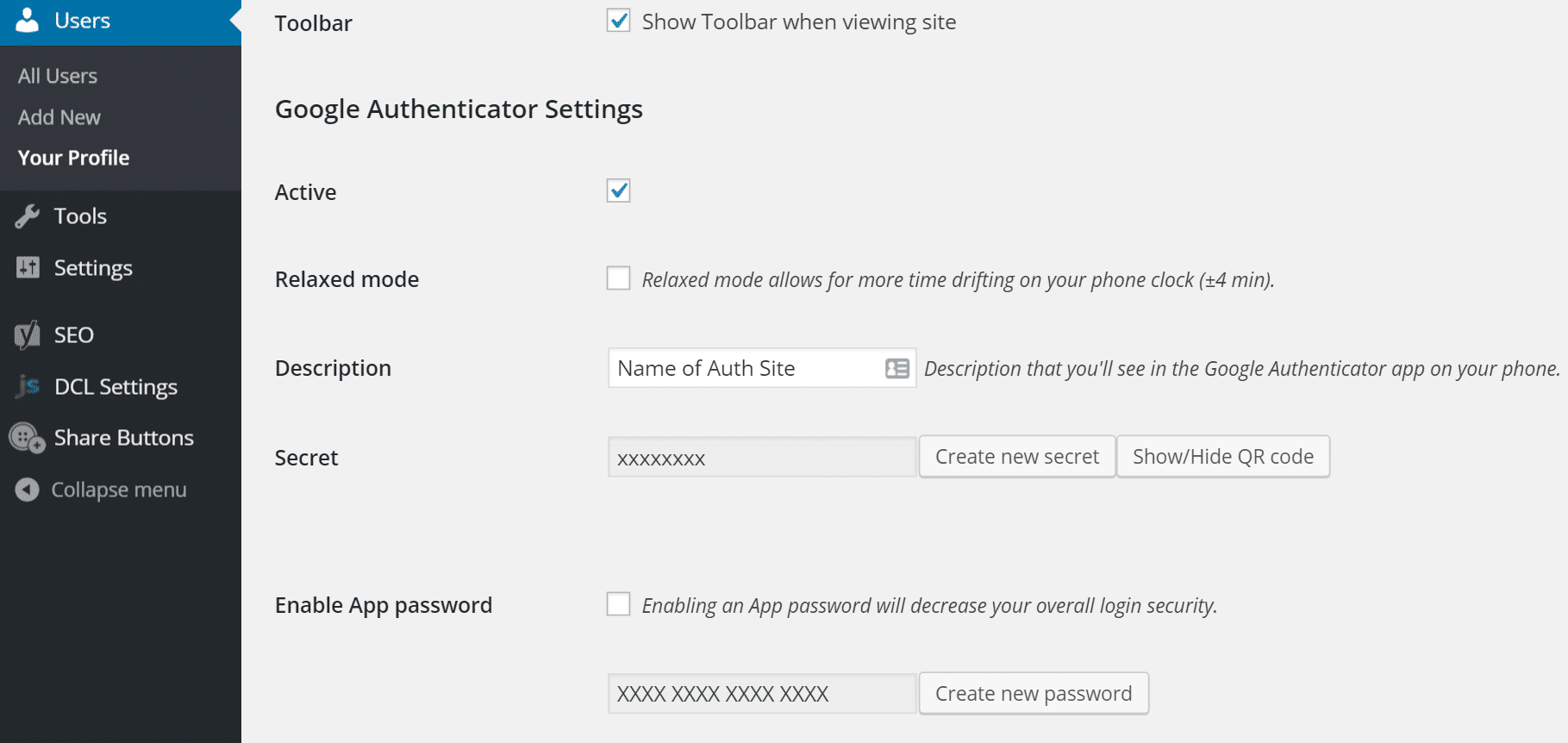
    On installing the plugin, you can click on your user profile, mark it active and create a new secret key or scan the QR code

    wordpress two-factor authentication setup
    Google Authenticator Settings

    Additionally, you can utilize the following free authenticator apps on your phone:

    On activating the authenticator app and creating a security key, it will then need your password and the code (6 Digit) from the Google authenticator app for login. You will observe an extra field that now shows on your WordPress login page.

    Google Authenticator WordPress login

    That’s all, you now have two-factor authentication enabled on you WordPress site.

    Conclusion

    We hope this article helped you know the importance of WordPress two factor authentication.

    Additionally, you can check out our cheap Linux VPS hosting plans that guarantee to improve website loading speed and enhance WordPress security.

  • WordPress Password Security Comprehensive Guide

    WordPress Password Security Comprehensive Guide

    WordPress is the most widely used content management system that powers over 40% of the total websites in the world. These stats and the popularity of WordPress can’t go unnoticed. In the world of the internet, it also becoming a popular content management system between bad actors. So in order to safeguard it against threat actors, you need to improve WordPress password security.

    You need to seriously toughen the security of your WordPress site if you want to keep it secure

    Having said that, let’s see how to password protect WordPress and thereby improve WordPress security.

    Basic WordPress Password Security Needs

    Below we have crafted a list that tells about things to consider while creating a WordPress site password:

    • WordPress password should incorporate numbers, uppercase and lowercase letters, and it will be best if you use special characters like (@,#,*, etc.)
    • Password should be at least 10 characters long
    • Spaces are allowed in password
    • Don’t use the same password on various accounts
    • Modify or change your passwords at regular intervals (3 months)

    Note: If you want to password-protect the WordPress website, please make sure that you follow the above-mentioned suggestions. However, you can use any combination as a password.

    Enhancing the WordPress Password Security

    You can improve the WordPress password security by following the following suggestions:

    Password Length is Important

    The length of the password is extremely important while you create a password for a WordPress website

    These hackers are getting smarter with each passing day They use brute force attacks to break into your website. Brute force attacks work by continuously trying the words from dictionaries. These dictionaries may contain millions of words that are used commonly in day-to-day life.

    To counter brute force attacks, you can limit login attempts in WordPress. By doing so, you can block the spammer from logging in.

    Now, let’s come back to our topic. The password you generate should be mixed characters (alphabet, special characters, and numbers).

    Cracking a password that is at least 10 characters long and having mixed characters will take years than a 6 digit password with just alphabets or just numbers which be easily cracked within days or even hours.

    Use Two-Factor Authentication (2FA) for Better Security

    There might be a case when someone tries to keep on logging into your WordPress site. In such a situation, if you already implemented 2FA into your site, the threat actor won’t be able to log in even if he manages to get the login credentials.

    He/she, won’t be able to access the dashboard unless and until their identification is proved.

    He/she needs to prove his/her identity through an OTP or phone call.

    This makes it practically impossible to log in without any permission from respective admins.

    WordPress’s plugins library is so huge that you can find Plugins that enable 2FA set up and additionally automate password updating and trace any password changes.

    Best Two-Factor Authentication Plugins for WordPress:

    • Google Authenticator
    • Two-Factor
    • WordPress 2-Step Verification
    • WP 2FA

    Don’t use the Same Password for Multiple Accounts

    One of the best password security practices is not to use the same password for more than one accounts and website. Even for social media accounts and email accounts, you shouldn’t use the same password.

    So, make sure that you use a unique password for every website you sign up for.

    In case you feel that you can’t memorize the list of passwords, you can alternatively use a password manager

    Note: Never store the password of any website to your browser, as it is easy for hackers to extract username and password from your chrome profile.

    Few of the Best Password Managers you can use:

    • LastPass
    • 1Password
    • Dashboard

    Personally, I use LastPass as my password manager. It is secure and quite convenient for me to store all the passwords in one place.

    Regularly Update Password

    You know how crucial it is to regularly install WordPress upgrades and Plugins updates. Similarly, you should regularly update the WordPress password also.

    Even when you have implemented all the best password techniques if you keep on using similar passwords for multiple accounts for several years, there is a high possibility that your password will be leaked.

    So, this is the reason why most security experts suggest that the ideal password lifespan should not be more than 4 months.

    By regularly updating the password, you have a big advantage that even if you forget to log out from devices, once you change or reset the password, you will be logged out from all sessions.

    Changing vs Resetting WordPress Password: What’s The Difference

    Changing Vs resetting WordPress passwords is pretty much different.

    The major difference lies between Changing Vs resetting WordPress passwords is that you need to be aware of your existing password while changing the password. However, in the case of resetting, you simply do it you do it because you don’t remember your old password and hence want to set a new password.

    Changing WordPress Website Password

    To change your WordPress website’s password, you need to follow below steps:

    • Do WordPress login
    • Secondly, navigate to the User profile page
    • Lastly, set a new password for your WordPress site

    Note: To change your WordPress password, you need to know the password you are currently using.

    Resetting WordPress Website Password

    if you can’t remember your password, there is only one option left i.e: reset the password of your WordPress site.

    For resetting your WordPress website’s password, you need to head over to the ‘wp-admin page’ and then click the forgot password button.

    Once you open this page, the subsequent step is to enter your username or email. You will obtain an email with a password reset link to your registered email.

    Conclusion

    We hope this article helped you understand how to improve WordPress password security.

    In a nutshell, you should keep your WordPress password lengthy and use mixed characters. Once you do this, you are halfway there.

    Additionally, you can check out the Managed WordPress Hosting plans that come with SSD storage and guarantee a speed boost.

  • Why Use a WordPress Website Maintenance Service?

    Why Use a WordPress Website Maintenance Service?

    If you seek the best website maintenance services for your WordPress site, this article is for you. In this article, we will be discussing some of the best WordPress website maintenance services and why you should start using them.

    With a website maintenance service, you don’t have to worry about performing maintenance by yourself. The service includes taking care of backups, security, updates, and website edits.

    Why Should You Use a WordPress Website Maintenance Service?

    If you are running a self-hosted WordPress.org site, then there are few important WordPress maintenance tasks that you need to perform manually. Some of the tasks include installation of WordPress core updates, plugins and themes updates and regularly backing up your site.

    However, if you feel that these tasks are taking too much of your time and instead would like to spend the time on growing your business, then, it would be best if you are looking for a good WordPress website maintenance service. It should provide the following services:

    Backups

    With backup service, you will obtain the regular backup of your website. This signifies that if something goes wrong with your website, your site can be restored with the help of backups instantly.

    Also Read: 3 Best WordPress Backup Plugins

    Security

    By using a website maintenance service, your website will be safe and secure as they perform regular automated scans. Moreover, most of the companies can help you deal with any issues such as hacking attempts or malware threats.

    Also Read: Simple Tips for WordPress Security

    Expert WordPress Support

    Being a beginner, you likely need help in fixing common HTTP errors faced on your website. Having expert WordPress support will save your time as you won’t need to look for tutorials to fix the issues yourself. However, you need to note that not all WordPress website maintenance service package offers support with their plans.

    Timely WordPress Updates

    You can save your time by opting for a website maintenance service as they keep everything updated for you. You don’t have to spend time manually updating the WordPress plugins. Additionally, you can read our blog post on “8 Essential WordPress Plugins That You Must Install”.

    Having said that, let’s see our penned list of the best site maintenance services for WordPress.

    Best Website Maintenance Services For Your WordPress Site

    WP Buffs

    WP Buffs is a well-established WordPress maintenance service that offers cloud backups, emergency support, speed optimization, weekly website updates, countless website edits, and many more.

    They have plans which are apt for the average website owner as well as the perform plan for eCommerce stores, membership websites, and more complicated websites.

    Pricing

    WP Buffs’ lowest plans begin from $67/month. Additionally, if you need priority support, malware removal speed optimization, and other extras then, you will have to shell out $197/month. Moreover, you will receive heavy discounts on annual plans.

    Codeable

    Codeable is a platform where you can search and hire WordPress experts. If you are looking for a specially crafted maintenance package, this is a great way to look out for someone who can help you with it.

    For example, if you are searching for a developer who will help you in building a fast and secure site.

    As opposed to other platforms like work Fiverr, Upwork, Codeable has a strong evaluation process which gives assurance that you only work with experienced WordPress developers.

    Pricing

    The price of hiring an expert on Codeable is based on a $70 – $120 hourly rate and an additional 17.5% fixed service fee charged by Codeable.

    Maintainn

    Maintainn provides a broad set of plans that keep your website up to date and protected against threat actors. All their plans incorporate the weekly plugin, theme, and WordPress updates. Additionally, they offer a 24/7 security monitoring service that gives you an alert if your site is hacked.

    At the ‘Professional’ or greater price range plans, Maintainn offers services such as uptime monitoring and eCommerce support.

    Pricing

    Maintainn’s standard plan comes at $59/month. If you have an eCommerce website, then we suggest opting for the ‘Professional’ plan that comes at $179/month. And if you own bigger websites that have multiple people working on them, then you can opt for an Enterprise plan that starts at $299/month.

    Conclusion

    We hope that our article has helped you know why you must use a WordPress website maintenance service.

    Additionally, you can check out our cheap Linux VPS hosting plans that offer fully managed support to help you immediately in website maintenance.

  • 8 Essential WordPress Plugins That You Must Install

    8 Essential WordPress Plugins That You Must Install

    WordPress is one of the most famous Content Management System with 35% of total websites in the world are powered by WordPress. It is popular because it offers a wide range of features and flexibility. Moreover, the WordPress community is always contributing to enhancing the ecosystem. Though WordPress is an extremely simple platform, it lacks a few functionalities required to build a website. However, this space can be filled by obtaining the optimal WordPress plugins. But, with more than 56,000 free and premium WordPress plugins available in the market, it becomes quite difficult to pick the right WordPress plugins for your WordPress website.

    Besides WordPress, there are other few CMS which you can know in brief by reading our following guide: Comparison of Top CMS: WordPress Vs Joomla Vs Drupal

    Now, we will be looking at some of the essential WordPress plugins that will indeed be a game-changer for your site.

    8 game-changer WordPress plugins

    Yoast SEO

    Yoast SEO, with over 5 million+ active installation is highly rated as the no. 1 WordPress SEO plugin. It is one of the most recommended plugin to make your website Search Engine friendly. From building XML Sitemaps to setting canonical URLs, Yoast has always been a great tool in making SEO friendly website. Setting up this plugin is very easy, and there are lots of reference material online that will help you instantly set up this plugin for your WordPress website.

    Further suggested for Reading:

    W3 Total Cache

    You may know the fact of how crucial website speed is in the current digital age. Just a second slower page loading speed can mean lower search engine rankings and thereby resulting in lowe traffic volume. Fortunately, the plugin W3 Total Cache offers your site with caching capabilities such as Browser Cache, Page Cache, CDN integration, and many more. When accurately set up, the plugin guarantees to minimize page load time notably. Hence it provides a more enhanced experience for your website visitors. Additionally, this tool is compatible with all our Virtual Private Servers, Shared Hosting, and Dedicated Servers.

    Moreover, you can read this article on “Best Web Caching Solution for your website” to get clear idea about caching solution that may work for your site.

    WP Smush

    If you are experiencing a slow WordPress website, one major reason could be the huge image files that are stored on your website. Additionally, these huge files could be eating up your valuable server space. The plugin WP Smush allows a user to compress irrelevant data from the images and remarkably reduce the image size without compromising the image quality, with just a click of a button. You can either pick to minimize the size of the images individually or in bulk, of 50 images concurrently. A recent update of the plugin has brought in the image resizing feature that will scale down the images to predefined height and width.

    Related: Few Important Image SEO Tips You Need to Know

    Sucuri Security

    One common thing is found among websites that are prone to cyber threats. i.e: Lack of website security. No matter what website you operate to protect against malicious attackers, security should be your foremost priority. Sucuri Security is a WordPress Security plugin that observes and protects your website against harmful attacks such as brute-force attack, DDoS, XSS attack, malware threats, and many more. It monitors, scans, and blacklists attacks. Furthermore, the premium version of this plugin likewise offers a website firewall. We highly suggest this plugin to keep your website safe against security threats.

    Also Read:

    Social Media Flying Icons

    SEO experts suggest that the best form of social media icons is the one that floats as and when user scrolls. The reason is that it allows your website visitor to quickly share your content regardless of the part of the page he/she is at. If you need the ability to add a social media floating bar, then you should consider the plugin ‘Social Media Flying Icons’. It is one of the simplest plugins to configure enabling you to pick from versatile icon themes.

    If you are Kneen about social media marketing tips “Few Social Media Marketing Mistakes You Should Avoid“

    Broken Link Checker

    As the name says, the plugin monitors your WordPress site and if any broken link is found then it will notify you through dashboard or email. broken links can be a disaster for site’s reputation and the only way to prevent is to making sure that all your links are updated correctly. You don’t require to manually update each post to resolve the broken link instead you need to edit links directly from plugin page.

    Related: What are Broken Links, How it Affects Your Website and How to Fix them?

    Redirection

    Another crucial plugin to rethink for your website is Redirection. This tool allows you to manage your 301 redirects and track down the 404 errors and resolve them. You don’t need any knowledge regarding Apache or Nginx to execute redirects.

    Related: Simple Tutorial to create 301 redirect WordPress (Using plugin and .htaccess)

    WooCommerce

    WooComerce is a powerful platform on its own. You can easily build power packed eCommerce store for that your needs. It is particularly designed for small to large sized online merchants using WordPress.

    If you own a eCommerce store then your read our blog post on “Best Softaculous E-Commerce Apps For Your Business“

    Conclusion

    Though several other plugins deserve a spot here, we think that our list mainly covers all the crucial WordPress plugins that will enrich your WordPress site.

    Additionally, you can check out our cheap Linux VPS hosting plans that offer fully managed support to help you immediately in setting up your server.

  • Simple Tips for WordPress Security

    Simple Tips for WordPress Security

    In this article, I will be giving you some tips for WordPress Security. So let’s get started

    Having a website hacked could be a major disaster for businesses. For instance, if an online company holds a client’s sensitive or private data and in the worst case, the site gets hacked. Then it would be a nightmare for site owners as it could negatively affect the brand, lesser sales, and legal outcomes.

    As per the reports of WordPress security experts, they say that most of the vulnerabilities were caused due to user-related reasons such as failure to update the system, vulnerabilities in plugins and themes installed by website owners, lack of maintenance by webmasters, misconfiguration problems.

    So in this article, we are going to review the latest WordPress security advancements. To keep your WordPress website protected, take a look at the following tips.

    Meanwhile you could read how to increase WordPress maximum upload file size

    Some WordPress Security Issues

    The below list contains some of the most vital security issues that WordPress user face currently:

    • Weak Passwords
    • Inactive users
    • Brute Force Attacks
    • Outdated System

    Tips for WordPress Security

    Below, we have listed 5 simple tips for securing your WordPress site against attackers:

    Always Keep Your CMS Updated

    It is important to install the latest updates of security patches from WordPress developers as the latest security patches protect it from attacks.

    Install a Firewall

    To block a brute force attack, you need to install a firewall to prevent server crashes or website speed problems. You can install a WordPress firewall plugin that monitors the incoming traffic and restricts access for hackers. However this firewall solution not efficient as a DNS level firewall. The DNS level firewall restricts the bad traffic from winding up on your website by routing it via its own cloud proxy servers.

    Use Strong Passwords For Accounts

    For WordPress security, you must use strong passwords. Additionally, you can reduce the risk of brute force attacks.

    There are two ways through which you could generate strong passwords:

    • Create complex passwords with a random password generator
    • Install Force Strong Passwords plugin for strong passwords.

    Limit Login Attempts

    Limiting the number of trials for someone to login you can increase WordPress security as hackers commonly use the brute force method to randomly guess your login credentials. So by installing a plugin WPS Limit Login you could limit the attempts for login and prevent hackers from executing brute force attack

    Monitor Admin Activity

    In case your WordPress Website has several users then you must trace their activity to spot security issues such as unauthorized users, monitor suspicious activity.

    You need to install a plugin like WP Security Audit Log. It gives real-time user monitoring and lets to detect the below modifications:

    • Menu and widget modifications
    • Post and page modifications
    • Category and tag modifications
    • User activity, including login, logout, eliminating other activity sessions and failed logins
    • Registration of fresh users, deletion of current users, and modifying their accounts
    • Modifications in user profiles, including display name, role, email, and password
    • WordPress settings modifications
    • Modifications in plugins or themes
    • Site file modifications.

    In short, you can trace almost any activity done by other users on your website.

    Hope these tip would help in improve WordPress Security. Additionally, you can read Converting the WordPress website to HTML